建议使用本模板发帖,也可以自由编辑,但必须完整描述产品及问题(至少包含:产品名称、版本、问题描述)。
产品型号 / 套件:k230基础版
版本 / 规格:
控制板 / 主板:
操作系统 / 软件 / 固件版本:
参考的教程或步骤:WonderMK 模板匹配检测
问题描述:用了程序代码,但是显示这个问题
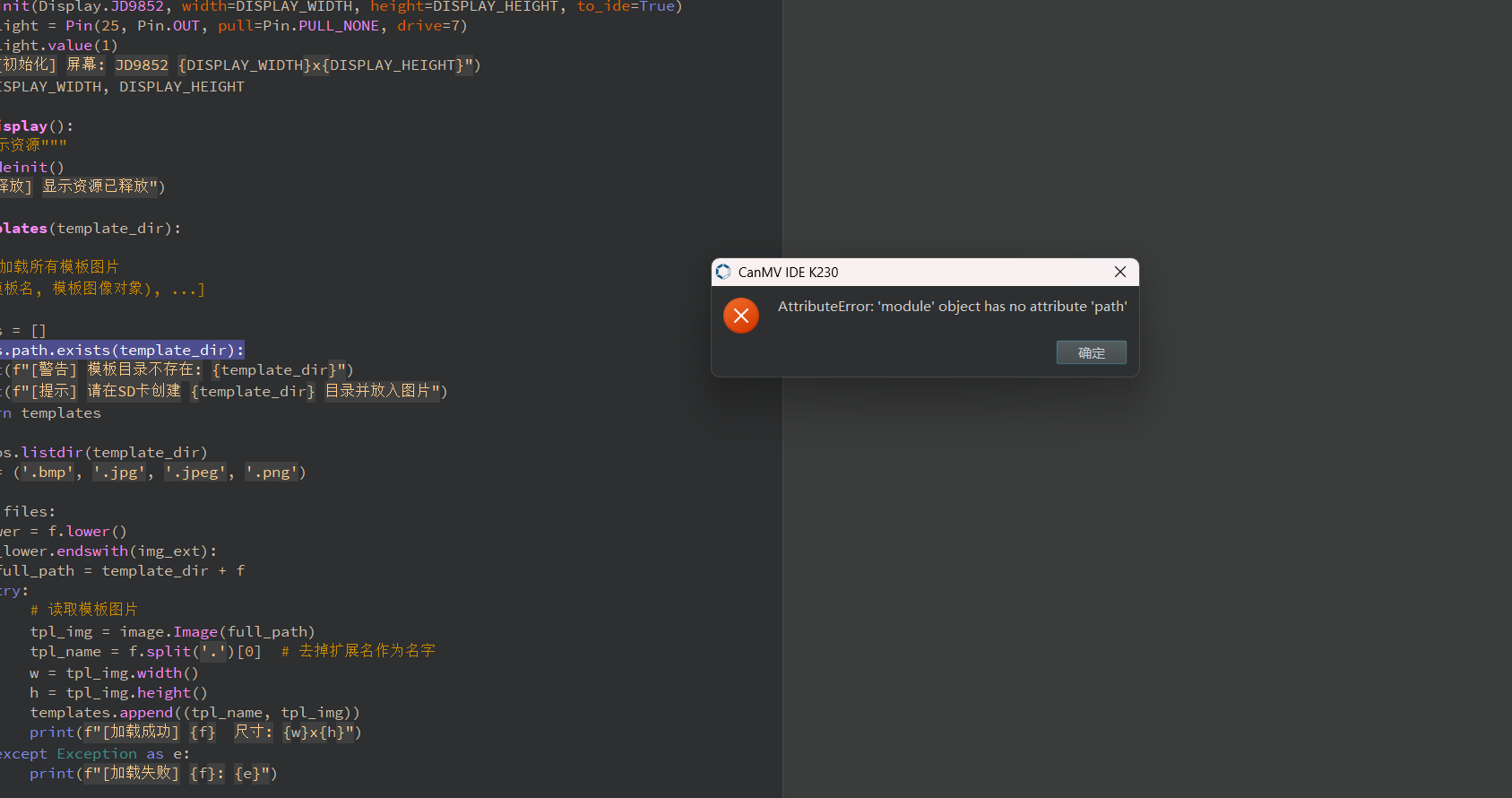
报错信息 / 日志 / 截图:
复现步骤:
1.
2.
3.
已尝试的排查:都是按照步骤来的
补充说明:“”"
模板匹配检测程序 - WonderMK视觉模块(K230)
功能:从SD卡加载用户上传的模板图片,摄像头实时检测画面中的目标图片,检测到后自动画框
使用方法:
- 将你想要识别的图片(.bmp或.jpg格式)放入SD卡的 /sdcard/template/ 目录下
- 建议图片尺寸:64x64 ~ 128x128 像素
- 图片命名示例:target.bmp、my_logo.jpg 等
- 运行本程序即可实时识别并画框
匹配阈值说明:
- threshold: 0~1之间,越高越严格,越低越容易匹配(但误报也会增多)
- 推荐值:0.6 ~ 0.8
“”"
import time, os, sys
from machine import Pin
from media.sensor import *
from media.display import *
from media.media import *
===================== 配置参数区 =====================
屏幕参数 (JD9852)
DISPLAY_WIDTH = 320
DISPLAY_HEIGHT = 240
摄像头参数
SENSOR_WIDTH = 320
SENSOR_HEIGHT = 240
模板图片存放目录 (SD卡路径)
TEMPLATE_DIR = “/sdcard/template/”
匹配阈值 (0~1,越高要求越相似)
MATCH_THRESHOLD = 0.7
每次检测的滑动步长 (越小越精确,但速度越慢)
SEARCH_STEP = 2
框颜色 (R, G, B)
BOX_COLOR = (255, 0, 0) # 红色
BOX_THICKNESS = 3
=====================================================
全局变量防止背光Pin被GC
lcd_backlight = None
def init_display():
“”“初始化JD9852屏幕和背光”“”
global lcd_backlight
Display.init(Display.JD9852, width=DISPLAY_WIDTH, height=DISPLAY_HEIGHT, to_ide=True)
lcd_backlight = Pin(25, Pin.OUT, pull=Pin.PULL_NONE, drive=7)
lcd_backlight.value(1)
print(f"[初始化] 屏幕: JD9852 {DISPLAY_WIDTH}x{DISPLAY_HEIGHT}")
return DISPLAY_WIDTH, DISPLAY_HEIGHT
def deinit_display():
“”“释放显示资源”“”
Display.deinit()
print(“[释放] 显示资源已释放”)
def load_templates(template_dir):
“”"
从指定目录加载所有模板图片
返回: [(模板名, 模板图像对象), …]
“”"
templates =
if not os.path.exists(template_dir):
print(f"[警告] 模板目录不存在: {template_dir}“)
print(f”[提示] 请在SD卡创建 {template_dir} 目录并放入图片")
return templates
files = os.listdir(template_dir)
img_ext = ('.bmp', '.jpg', '.jpeg', '.png')

for f in files:
    f_lower = f.lower()
    if f_lower.endswith(img_ext):
        full_path = template_dir + f
        try:
            # 读取模板图片
            tpl_img = image.Image(full_path)
            tpl_name = f.split('.')[0]  # 去掉扩展名作为名字
            w = tpl_img.width()
            h = tpl_img.height()
            templates.append((tpl_name, tpl_img))
            print(f"[加载成功] {f}  尺寸: {w}x{h}")
        except Exception as e:
            print(f"[加载失败] {f}: {e}")

print(f"[汇总] 共加载 {len(templates)} 张模板图片")
return templates
def find_template_simple(img, template, tpl_name, threshold=MATCH_THRESHOLD, step=SEARCH_STEP):
“”"
简化版单尺度模板匹配 (优先使用,兼容性最好)
返回: (x, y, w, h, score, name, scale) 或 None
“”"
tpl_w = template.width()
tpl_h = template.height()
frame_w = img.width()
frame_h = img.height()
if tpl_w >= frame_w or tpl_h >= frame_h:
    return None

try:
    # 方式1: 标准 OpenMV find_template API
    # 有些版本返回 (x, y, w, h, score),有些返回 (x, y, w, h)
    result = img.find_template(template, threshold=threshold, step=step)
    if result is not None and len(result) >= 4:
        score = result[4] if len(result) > 4 else threshold
        return (result[0], result[1], result[2], result[3], score, tpl_name, 1.0)
except Exception as e:
    # 方式2: find_template 可能返回列表
    try:
        matches = img.find_template(template, threshold=threshold, step=step)
        if matches and isinstance(matches, list) and len(matches) > 0:
            m = matches[0]
            if len(m) >= 4:
                score = m[4] if len(m) > 4 else threshold
                return (m[0], m[1], m[2], m[3], score, tpl_name, 1.0)
    except:
        pass

return None
def find_template_multiscale(img, template, tpl_name, threshold=MATCH_THRESHOLD, step=SEARCH_STEP):
“”"
多尺度模板匹配 (带多种fallback方案)
返回: (x, y, w, h, score, name, scale) 或 None
“”"
tpl_w = template.width()
tpl_h = template.height()
frame_w = img.width()
frame_h = img.height()
if tpl_w >= frame_w or tpl_h >= frame_h:
    return None

# 先试原始尺寸 (最快,命中率最高)
result = find_template_simple(img, template, tpl_name, threshold, step)
if result is not None:
    return result

best_match = None
best_score = 0.0

# 再试多尺度缩放
# 先尝试小尺寸(画面中的目标通常比模板小)
scales = [0.8, 0.6, 1.2, 1.4, 0.5]

for scale in scales:
    sw = int(tpl_w * scale)
    sh = int(tpl_h * scale)

    if sw >= frame_w or sh >= frame_h or sw < 8 or sh < 8:
        continue

    # 尝试缩放模板
    scaled_tpl = None
    try:
        # 方式A: scale方法
        scaled_tpl = template.scale(sw, sh)
    except:
        try:
            # 方式B: resize方法
            scaled_tpl = template.resize(sw, sh)
        except:
            continue

    if scaled_tpl is None:
        continue

    try:
        result = img.find_template(scaled_tpl, threshold=threshold, step=step)
        if result is not None:
            # 处理返回值:可能是tuple或list
            m = result if isinstance(result, tuple) else (result[0] if isinstance(result, list) and len(result) > 0 else None)
            if m is not None and len(m) >= 4:
                score = m[4] if len(m) > 4 else threshold
                if score > best_score:
                    best_score = score
                    best_match = (m[0], m[1], m[2], m[3], score, tpl_name, scale)
    except:
        continue

return best_match
def draw_detection_result(img, match_result):
“”"
在图像上绘制检测结果框
match_result: (x, y, w, h, score, name, scale)
“”"
if match_result is None:
return
x, y, w, h, score, name, scale = match_result

# 画矩形框
img.draw_rectangle(x, y, w, h, color=BOX_COLOR, thickness=BOX_THICKNESS)

# 在框上方绘制标签 (名称 + 相似度)
label = f"{name} {score*100:.0f}%"
try:
    # 先画文字背景条(提高可读性)
    text_w = len(label) * 12
    img.draw_rectangle(x, max(0, y - 22), text_w + 8, 22, color=BOX_COLOR, fill=True)
    img.draw_string_advanced(x + 4, max(2, y - 20), 18, label, color=(255, 255, 255))
except:
    # 兼容旧版API
    img.draw_string(x + 2, y - 16, label, color=(255, 255, 255))
def main():
print(“=” * 50)
print(" WonderMK 模板匹配检测系统")
print(“=” * 50)
# 1. 初始化显示
lcd_w, lcd_h = init_display()

# 2. 初始化摄像头
sensor = Sensor()
sensor.reset()
sensor.set_framesize(width=SENSOR_WIDTH, height=SENSOR_HEIGHT)
sensor.set_pixformat(Sensor.RGB565)
print(f"[初始化] 摄像头: {SENSOR_WIDTH}x{SENSOR_HEIGHT} RGB565")

# 3. 初始化媒体管理
MediaManager.init()
sensor.run()
print("[初始化] 媒体资源就绪,摄像头已启动")

# 4. 加载模板图片
templates = load_templates(TEMPLATE_DIR)

if len(templates) == 0:
    print("\n[错误] 没有加载到任何模板图片!")
    print(f"[操作] 请按以下步骤添加模板:")
    print(f"  1. 将SD卡插入电脑")
    print(f"  2. 创建目录: {TEMPLATE_DIR}")
    print(f"  3. 放入你想识别的图片(.bmp/.jpg),建议64x64~128x128像素")
    print(f"  4. 重新插拔SD卡,重启程序")
    # 显示提示画面
    tip_img = image.Image(lcd_w, lcd_h, image.RGB565)
    tip_img.clear()
    tip_img.draw_string_advanced(20, 60, 22, "No template image!", color=(255, 0, 0))
    tip_img.draw_string_advanced(20, 100, 18, "Put images in SD:/template/", color=(255, 255, 0))
    tip_img.draw_string_advanced(20, 140, 18, "then restart program.", color=(255, 255, 0))
    Display.show_image(tip_img)
    # 等待用户中断
    while True:
        time.sleep(1)

clock = time.clock()
print("\n[启动] 开始实时检测... (按Ctrl+C停止)")
print("-" * 50)

try:
    while True:
        clock.tick()

        # 拍摄一帧
        img = sensor.snapshot()

        # 对每张模板进行匹配
        all_matches = []
        for tpl_name, tpl_img in templates:
            result = find_template_multiscale(
                img,
                tpl_img,
                tpl_name,
                threshold=MATCH_THRESHOLD,
                step=SEARCH_STEP
            )
            if result is not None:
                all_matches.append(result)
                print(f"[检测] 匹配到: {tpl_name}  相似度:{result[4]*100:.1f}%  位置:({result[0]},{result[1]})")

        # 绘制所有检测结果
        for match in all_matches:
            draw_detection_result(img, match)

        # 在左上角显示 FPS
        fps = clock.fps()
        try:
            img.draw_string_advanced(5, 5, 16, f"FPS:{fps:.1f}  Tpl:{len(templates)}", color=(0, 255, 0))
        except:
            pass

        # 显示画面
        Display.show_image(img)

except KeyboardInterrupt:
    print("\n[用户] 手动中断程序")
except Exception as e:
    print(f"\n[错误] 异常: {e}")
    import sys
    sys.print_exception(e)
finally:
    print("[清理] 正在释放资源...")
    sensor.stop()
    deinit_display()
    MediaManager.deinit()
    print("[完成] 程序已退出")
if name == “main”:
os.exitpoint(os.EXITPOINT_ENABLE)
main()
这是模板代码,请问是什么问题
