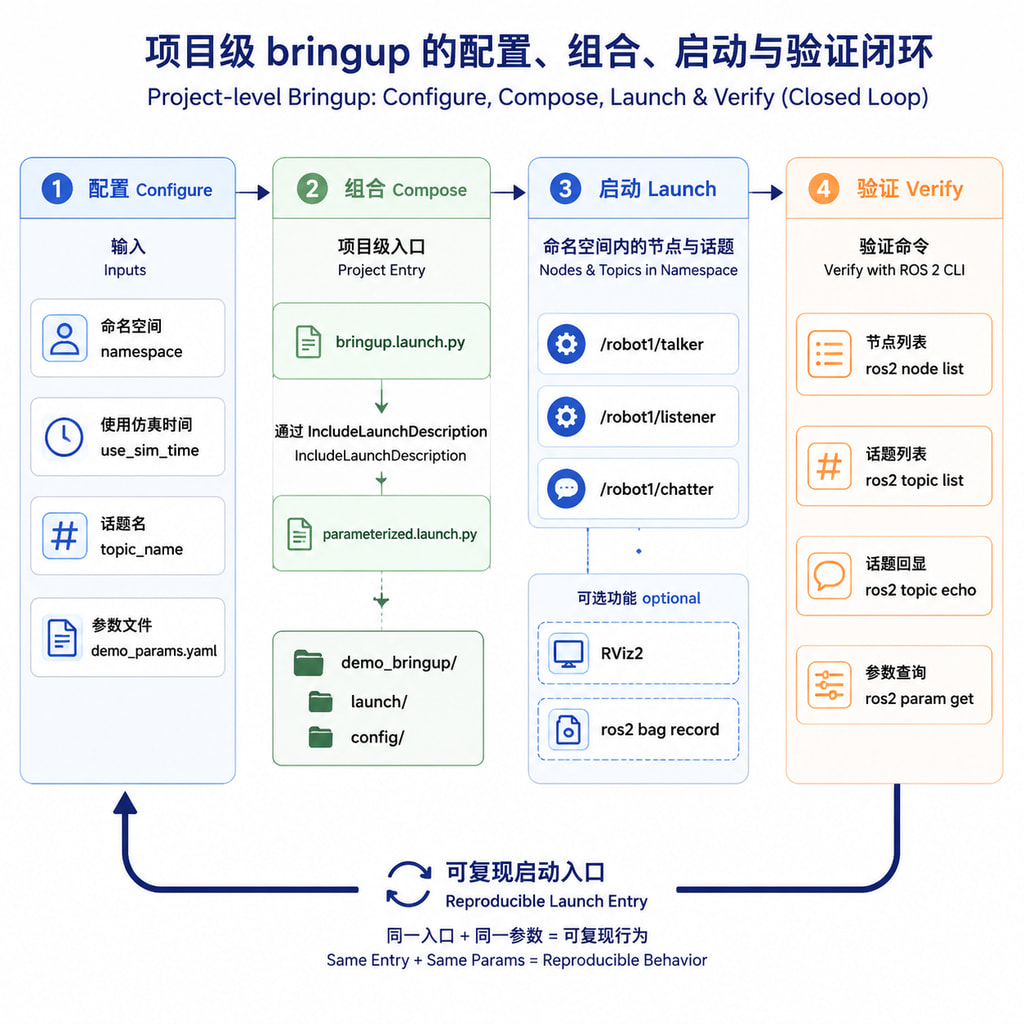
《Launch 启动文件:一键拉起多节点与传参技巧》
Launch 启动文件用于把多个 ROS 节点、参数、话题重映射、命名空间、配置文件和启动条件组织成一次启动。本文以 ROS 2 Python Launch 为主,给出一个可复制的 demo_bringup 示例包,并补充 ROS 1 XML 对照。
1. 版本与前置条件
| 项目 | 目标版本 |
|---|---|
| ROS 2 主示例 | Humble |
| ROS 2 兼容 | Jazzy |
| Humble 系统 | Ubuntu 22.04 |
| Jazzy 系统 | Ubuntu 24.04 |
| Launch 语言 | Python |
| ROS 1 对照 | Noetic + Ubuntu 20.04 |
ROS 2 Humble/Jazzy 的本文 API 基本一致;ROS 1 的 roslaunch XML 与 ROS 2 Python Launch 不要混用。
前置条件:
- 已安装对应版本 ROS 2、colcon 和 rosdep。
- 已 source ROS 环境。
- 能够安装 demo_nodes_cpp、demo_nodes_py;RViz 和 rosbag2 示例还需要对应工具。
- 有一个可写的 ROS 2 工作空间。
检查环境:
printenv ROS_DISTRO
which ros2
which colcon
ros2 doctor --report
Humble:
source /opt/ros/humble/setup.bash
sudo apt update
sudo apt install ros-humble-demo-nodes-cpp ros-humble-demo-nodes-py
Jazzy:
source /opt/ros/jazzy/setup.bash
sudo apt update
sudo apt install ros-jazzy-demo-nodes-cpp ros-jazzy-demo-nodes-py
已经 source 后,也可以使用:
sudo apt install ros-$ROS_DISTRO-demo-nodes-cpp ros-$ROS_DISTRO-demo-nodes-py
可选示例依赖:
sudo apt install \
  ros-$ROS_DISTRO-rviz2 \
  ros-$ROS_DISTRO-ros2bag \
  ros-$ROS_DISTRO-rosbag2-storage-default-plugins
2. Launch 的基本模型
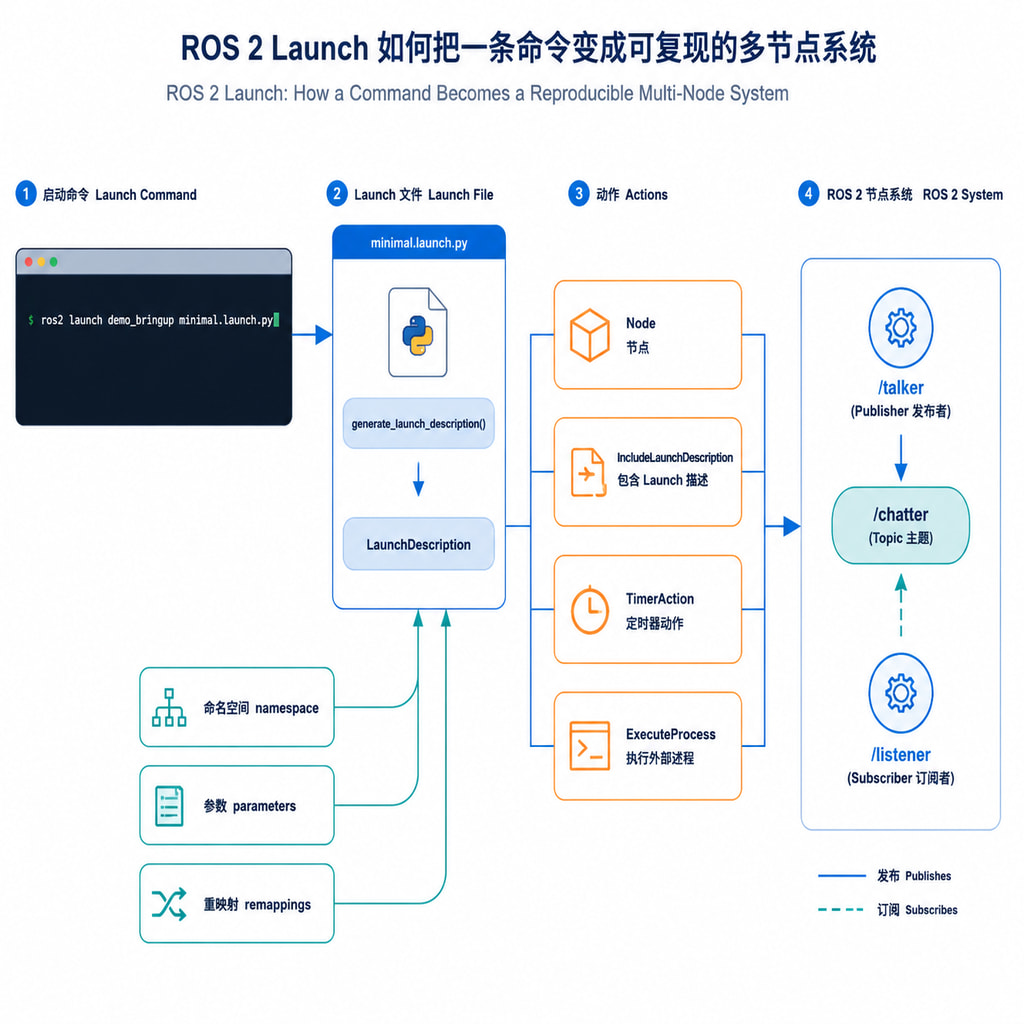
ROS 2 Python Launch 通常包含:
- 导入 Launch API。
- 定义 generate_launch_description。
- 创建 Node、IncludeLaunchDescription、TimerAction 或 ExecuteProcess。
- 返回 LaunchDescription。
- 用 ros2 launch 运行。
最小结构:
from launch import LaunchDescription
from launch_ros.actions import Node


def generate_launch_description():
    return LaunchDescription([
        Node(
            package='some_package',
            executable='some_executable',
            name='some_node',
            output='screen',
        ),
    ])
Launch 参数和 ROS 参数不是一回事:
| 类型 | 用途 | 常见写法 |
|---|---|---|
| Launch 参数 | 启动时改变结构或配置 | namespace、topic_name |
| ROS 参数 | 传给节点 | use_sim_time、rate |
| 参数文件 | 集中保存 ROS 参数 | config/params.yaml |
| remappings | 改变接口名称 | chatter → status |
| namespace | 隔离节点实例 | /robot1/talker |
Launch 参数通过 DeclareLaunchArgument 声明,通过 LaunchConfiguration 读取:
from launch.actions import DeclareLaunchArgument
from launch.substitutions import LaunchConfiguration

DeclareLaunchArgument(
    'namespace',
    default_value='demo',
    description='节点命名空间',
)
namespace = LaunchConfiguration('namespace')
启动时传值:
ros2 launch demo_bringup parameterized.launch.py namespace:=robot1
相对名称会随 namespace 变化,绝对名称不会变化:
remappings=[
    ('chatter', 'status'),
    ('debug', '/global_debug'),
]
3. 创建示例包
mkdir -p ~/ros2_ws/src
cd ~/ros2_ws/src

ros2 pkg create demo_bringup \
  --build-type ament_python \
  --dependencies launch launch_ros demo_nodes_cpp demo_nodes_py

cd demo_bringup
mkdir -p launch config
目录:
demo_bringup/
├── config/
├── demo_bringup/
├── launch/
├── package.xml
├── resource/
├── setup.cfg
└── setup.py
ament_python 包需要在 setup.py 中安装 launch 和 config:
import os
from glob import glob
from setuptools import setup


package_name = 'demo_bringup'

setup(
    name=package_name,
    version='0.0.0',
    packages=[package_name],
    data_files=[
        (
            'share/ament_index/resource_index/packages',
            ['resource/' + package_name],
        ),
        ('share/' + package_name, ['package.xml']),
        (
            os.path.join('share', package_name, 'launch'),
            glob('launch/*.launch.py'),
        ),
        (
            os.path.join('share', package_name, 'config'),
            glob('config/*'),
        ),
    ],
    install_requires=['setuptools'],
    zip_safe=True,
)
忘记 data_files 时,源码目录虽然有 launch 文件,ros2 launch 仍可能在 install/share 中找不到它。
4. 示例一:启动一个节点
文件:demo_bringup/launch/minimal.launch.py
from launch import LaunchDescription
from launch_ros.actions import Node


def generate_launch_description():
    return LaunchDescription([
        Node(
            package='demo_nodes_cpp',
            executable='talker',
            name='talker',
            output='screen',
        ),
    ])
构建并运行:
cd ~/ros2_ws
rosdep install --from-paths src --ignore-src -r -y
colcon build --symlink-install --packages-select demo_bringup
source install/setup.bash
ros2 launch demo_bringup minimal.launch.py
验证:
ros2 node list
ros2 topic list
ros2 topic echo /chatter --once
预期能看到 /talker 和 /chatter。按 Ctrl+C 停止 launch。
5. 示例二:一键启动多个节点
文件:demo_bringup/launch/talker_listener.launch.py
from launch import LaunchDescription
from launch_ros.actions import Node


def generate_launch_description():
    return LaunchDescription([
        Node(
            package='demo_nodes_cpp',
            executable='talker',
            name='talker',
            output='screen',
        ),
        Node(
            package='demo_nodes_py',
            executable='listener',
            name='listener',
            output='screen',
        ),
    ])
运行和验证:
ros2 launch demo_bringup talker_listener.launch.py
ros2 node list
ros2 topic info /chatter
ros2 topic echo /chatter
应能看到 /talker、/listener,并看到 /chatter 同时有 publisher 和 subscription。
6. 示例三:传命名空间、话题名和仿真时间
文件:demo_bringup/launch/parameterized.launch.py
from launch import LaunchDescription
from launch.actions import DeclareLaunchArgument
from launch.substitutions import LaunchConfiguration
from launch_ros.actions import Node
from launch_ros.parameter_descriptions import ParameterValue


def generate_launch_description():
    namespace = LaunchConfiguration('namespace')
    topic_name = LaunchConfiguration('topic_name')
    use_sim_time = ParameterValue(
        LaunchConfiguration('use_sim_time'),
        value_type=bool,
    )

    return LaunchDescription([
        DeclareLaunchArgument(
            'namespace',
            default_value='demo',
            description='节点命名空间',
        ),
        DeclareLaunchArgument(
            'topic_name',
            default_value='chatter',
            description='重映射后的话题名',
        ),
        DeclareLaunchArgument(
            'use_sim_time',
            default_value='false',
            description='是否使用 /clock',
        ),
        Node(
            package='demo_nodes_cpp',
            executable='talker',
            name='talker',
            namespace=namespace,
            parameters=[{'use_sim_time': use_sim_time}],
            remappings=[('chatter', topic_name)],
            output='screen',
        ),
        Node(
            package='demo_nodes_py',
            executable='listener',
            name='listener',
            namespace=namespace,
            parameters=[{'use_sim_time': use_sim_time}],
            remappings=[('chatter', topic_name)],
            output='screen',
        ),
    ])
运行:
ros2 launch demo_bringup parameterized.launch.py \
  namespace:=robot1 \
  topic_name:=status \
  use_sim_time:=false
验证:
ros2 node list
ros2 topic echo /robot1/status --once
ros2 param get /robot1/talker use_sim_time
ros2 launch demo_bringup parameterized.launch.py --show-args
命令行输入通常是字符串;布尔、整数和浮点参数建议使用 ParameterValue 明确类型。
7. 示例四:使用 YAML 参数文件
文件:demo_bringup/config/demo_params.yaml
/**:
  ros__parameters:
    use_sim_time: false
文件:demo_bringup/launch/yaml_parameters.launch.py
from launch import LaunchDescription
from launch.substitutions import PathJoinSubstitution
from launch_ros.actions import Node
from launch_ros.substitutions import FindPackageShare


def generate_launch_description():
    parameter_file = PathJoinSubstitution([
        FindPackageShare('demo_bringup'),
        'config',
        'demo_params.yaml',
    ])

    return LaunchDescription([
        Node(
            package='demo_nodes_cpp',
            executable='talker',
            name='talker',
            parameters=[parameter_file],
            output='screen',
        ),
        Node(
            package='demo_nodes_py',
            executable='listener',
            name='listener',
            parameters=[parameter_file],
            output='screen',
        ),
    ])
构建并验证:
cd ~/ros2_ws
colcon build --symlink-install --packages-select demo_bringup
source install/setup.bash
find install/demo_bringup/share/demo_bringup/config -type f -print
ros2 launch demo_bringup yaml_parameters.launch.py
ros2 param get /talker use_sim_time
YAML 修改后要重新构建并 source install/setup.bash;setup.py 也必须安装 config/*。
8. 示例五:include 子 launch,启动两套机器人
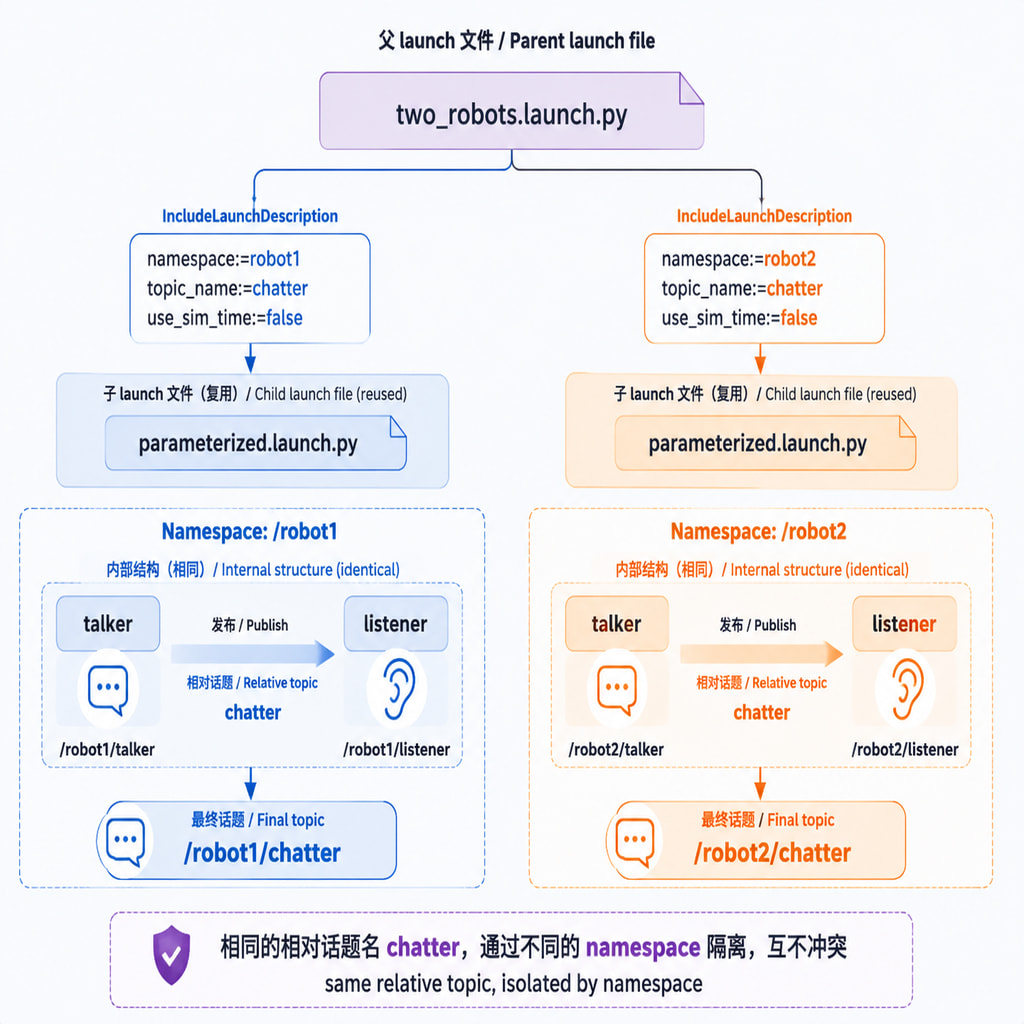
复用 parameterized.launch.py:
文件:demo_bringup/launch/two_robots.launch.py
from launch import LaunchDescription
from launch.actions import IncludeLaunchDescription
from launch.launch_description_sources import PythonLaunchDescriptionSource
from launch.substitutions import PathJoinSubstitution
from launch_ros.substitutions import FindPackageShare


def generate_launch_description():
    child = PathJoinSubstitution([
        FindPackageShare('demo_bringup'),
        'launch',
        'parameterized.launch.py',
    ])

    return LaunchDescription([
        IncludeLaunchDescription(
            PythonLaunchDescriptionSource(child),
            launch_arguments={
                'namespace': 'robot1',
                'topic_name': 'chatter',
                'use_sim_time': 'false',
            }.items(),
        ),
        IncludeLaunchDescription(
            PythonLaunchDescriptionSource(child),
            launch_arguments={
                'namespace': 'robot2',
                'topic_name': 'chatter',
                'use_sim_time': 'false',
            }.items(),
        ),
    ])
运行和验证:
ros2 launch demo_bringup two_robots.launch.py
ros2 node list
ros2 topic info /robot1/chatter
ros2 topic info /robot2/chatter
预期节点为 /robot1/talker、/robot1/listener、/robot2/talker、/robot2/listener。父 launch 传入的参数名必须在子 launch 中用 DeclareLaunchArgument 声明。
9. 示例六:GroupAction 和 PushRosNamespace
一组节点共享命名空间时:
from launch import LaunchDescription
from launch.actions import GroupAction
from launch_ros.actions import Node, PushRosNamespace


def generate_launch_description():
    return LaunchDescription([
        GroupAction([
            PushRosNamespace('robot_a'),
            Node(
                package='demo_nodes_cpp',
                executable='talker',
                name='talker',
                output='screen',
            ),
            Node(
                package='demo_nodes_py',
                executable='listener',
                name='listener',
                output='screen',
            ),
        ]),
    ])
命令:
ros2 launch demo_bringup group_namespace.launch.py
ros2 node list
ros2 topic list
10. 示例七:条件启动 RViz
文件:demo_bringup/launch/optional_rviz.launch.py
from launch import LaunchDescription
from launch.actions import DeclareLaunchArgument
from launch.conditions import IfCondition
from launch.substitutions import LaunchConfiguration
from launch_ros.actions import Node


def generate_launch_description():
    start_rviz = LaunchConfiguration('start_rviz')

    return LaunchDescription([
        DeclareLaunchArgument('start_rviz', default_value='false'),
        Node(
            package='demo_nodes_cpp',
            executable='talker',
            name='talker',
            output='screen',
        ),
        Node(
            package='rviz2',
            executable='rviz2',
            name='rviz2',
            condition=IfCondition(start_rviz),
            output='screen',
        ),
    ])
运行:
ros2 launch demo_bringup optional_rviz.launch.py start_rviz:=true
11. 示例八:TimerAction 和事件处理
TimerAction 适合简单错峰,但不代表依赖已经就绪:
from launch import LaunchDescription
from launch.actions import TimerAction
from launch_ros.actions import Node


def generate_launch_description():
    talker = Node(
        package='demo_nodes_cpp',
        executable='talker',
        name='talker',
        output='screen',
    )
    listener = Node(
        package='demo_nodes_py',
        executable='listener',
        name='listener',
        output='screen',
    )

    return LaunchDescription([
        talker,
        TimerAction(period=2.0, actions=[listener]),
    ])
需要在进程启动后触发动作时,使用 OnProcessStart:
from launch.actions import LogInfo, RegisterEventHandler
from launch.event_handlers import OnProcessStart


RegisterEventHandler(
    OnProcessStart(
        target_action=talker,
        on_start=[
            LogInfo(msg='talker process started'),
            listener,
        ],
    )
)
OnProcessStart 只表示进程启动,服务是否可用仍需等待或重试。
12. 示例九:ExecuteProcess 启动 rosbag2
from launch.actions import DeclareLaunchArgument, ExecuteProcess
from launch.conditions import IfCondition
from launch.substitutions import LaunchConfiguration


record_bag = LaunchConfiguration('record_bag')
bag_name = LaunchConfiguration('bag_name')

bag_process = ExecuteProcess(
    cmd=['ros2', 'bag', 'record', '-o', bag_name, '/chatter'],
    condition=IfCondition(record_bag),
    output='screen',
)
把它与 talker Node、DeclareLaunchArgument 放入 LaunchDescription 后运行:
ros2 launch demo_bringup record_bag.launch.py \
  record_bag:=true \
  bag_name:=talker_test
ros2 bag info talker_test
13. 示例十:组合模板
常见的机器人 bringup 会把这些能力组合起来:
from launch import LaunchDescription
from launch.actions import DeclareLaunchArgument, GroupAction
from launch.conditions import IfCondition
from launch.substitutions import LaunchConfiguration
from launch_ros.actions import Node
from launch_ros.parameter_descriptions import ParameterValue


def generate_launch_description():
    robot_ns = LaunchConfiguration('robot_ns')
    debug = LaunchConfiguration('debug')
    use_sim_time = ParameterValue(
        LaunchConfiguration('use_sim_time'),
        value_type=bool,
    )

    group = GroupAction([
        Node(
            package='demo_nodes_cpp',
            executable='talker',
            name='state_publisher',
            namespace=robot_ns,
            parameters=[{'use_sim_time': use_sim_time}],
            remappings=[('chatter', 'state')],
            output='screen',
        ),
        Node(
            package='demo_nodes_py',
            executable='listener',
            name='state_monitor',
            namespace=robot_ns,
            remappings=[('chatter', 'state')],
            output='screen',
        ),
        Node(
            package='demo_nodes_cpp',
            executable='listener',
            name='debug_listener',
            namespace=robot_ns,
            condition=IfCondition(debug),
            remappings=[('chatter', 'state')],
            output='screen',
        ),
    ])

    return LaunchDescription([
        DeclareLaunchArgument('robot_ns', default_value='robot1'),
        DeclareLaunchArgument('debug', default_value='false'),
        DeclareLaunchArgument('use_sim_time', default_value='false'),
        group,
    ])
运行:
ros2 launch demo_bringup combined.launch.py \
  robot_ns:=robot1 \
  debug:=true \
  use_sim_time:=false
ros2 topic echo /robot1/state --once
14. ROS 2 Launch API 速查
14.1 参数传递的三层关系
实际项目中通常同时存在三种参数入口:
| 层次 | 典型内容 | 读取方式 |
|---|---|---|
| Launch 参数 | namespace、地图路径、是否启动 RViz | LaunchConfiguration |
| Node 参数 | use_sim_time、频率、阈值 | parameters |
| YAML 参数 | 多个节点的完整参数集合 | parameters=[yaml_path] |
推荐把“运行模式”放在 Launch 参数中,把“节点行为”放在 ROS 参数或 YAML 中。例如:
ros2 launch demo_bringup bringup.launch.py \
  namespace:=robot1 \
  use_sim_time:=false
这里 namespace 和 use_sim_time 是 launch 入口参数;parameterized.launch.py 再把 use_sim_time 传给具体 Node。这样父 launch 负责组织,子 launch 负责节点实现。
14.2 namespace、name 和 remappings 的区别
- namespace 决定节点和相对接口的前缀。
- name 决定节点在 ROS 图中的名称。
- remappings 决定节点内部接口连接到哪个外部名称。
例如:
Node(
    package='demo_nodes_cpp',
    executable='talker',
    name='state_publisher',
    namespace='robot1',
    remappings=[('chatter', 'state')],
)
最终节点名是 /robot1/state_publisher,话题名是 /robot1/state。若 remappings 的目标写成 /state,则它会变成绝对话题,不再随 robot1 变化。
14.3 IncludeLaunchDescription 和 GroupAction 的选择
IncludeLaunchDescription 适合复用一个独立模块,例如 sensors.launch.py、navigation.launch.py 或一套机器人子系统。它可以为每次 include 传入不同参数。
GroupAction 适合在当前文件中把多个动作作为一组管理,常与 PushRosNamespace、条件和环境变量一起使用。简单规则是:
- 需要跨文件复用,使用 IncludeLaunchDescription。
- 只需要给当前几个节点加同一命名空间,使用 GroupAction。
- 需要启动多个实例时,优先使用子 launch 加不同 namespace。
14.4 条件、延时和事件不是同一类机制
| 机制 | 解决的问题 |
|---|---|
| IfCondition | 是否启动某个动作 |
| TimerAction | 延迟启动 |
| OnProcessStart | 进程开始后触发 |
| OnProcessExit | 进程退出后触发 |
| 服务等待/重试 | 依赖是否真正可用 |
不要用 TimerAction 代替服务就绪检测,也不要用 OnProcessStart 推断节点已经完成初始化。Launch 只负责启动流程,节点内部仍应对服务、动作服务器和硬件连接做超时与重试。
Node
Node(
    package='pkg_name',
    executable='executable_name',
    name='node_name',
    namespace='robot1',
    parameters=[{'key': 'value'}, '/path/to/params.yaml'],
    remappings=[('old_name', 'new_name')],
    arguments=['--ros-args'],
    output='screen',
    condition=IfCondition(enabled),
)
常用对象
| 对象 | 用途 |
|---|---|
| DeclareLaunchArgument | 声明命令行参数 |
| LaunchConfiguration | 读取启动参数 |
| IncludeLaunchDescription | 加载子 launch |
| GroupAction | 管理一组动作 |
| PushRosNamespace | 推入命名空间 |
| TimerAction | 延迟动作 |
| ExecuteProcess | 启动普通命令 |
| IfCondition | 条件启动 |
| PathJoinSubstitution | 拼接资源路径 |
| FindPackageShare | 查找包的 share 目录 |
| ParameterValue | 明确参数类型 |
15. ROS 1 XML 对照
以下只适用于 ROS 1 Noetic:
<launch>
  <arg name="namespace" default="sim"/>
  <arg name="start_teleop" default="true"/>
  <group ns="$(arg namespace)">
    <node
      pkg="turtlesim"
      type="turtlesim_node"
      name="sim"
      output="screen"/>
    <node
      pkg="turtlesim"
      type="turtle_teleop_key"
      name="teleop_key"
      output="screen"
      if="$(arg start_teleop)"/>
  </group>
</launch>
ROS 1:
roslaunch demo_bringup turtlesim_ros1.launch namespace:=sim start_teleop:=true
ROS 2:
ros2 launch demo_bringup parameterized.launch.py namespace:=robot1
迁移时不能只把 type 改名为 executable;包名、参数接口、QoS 和可执行程序名都要重新确认。
16. 标准构建与验证流程
步骤 1:检查语法
python3 -m py_compile launch/*.launch.py
步骤 2:安装依赖并构建
cd ~/ros2_ws
rosdep install --from-paths src --ignore-src -r -y
colcon build --symlink-install --packages-select demo_bringup
source install/setup.bash
步骤 3:确认资源已安装
find install/demo_bringup/share/demo_bringup/launch -type f -print
find install/demo_bringup/share/demo_bringup/config -type f -print
步骤 4:启动并验证
ros2 launch demo_bringup parameterized.launch.py \
  namespace:=robot1 \
  topic_name:=status

ros2 node list
ros2 topic list
ros2 topic info /robot1/status
ros2 topic echo /robot1/status --once
ros2 param get /robot1/talker use_sim_time
预期结果:节点列表出现 /robot1/talker 和 /robot1/listener;/robot1/status 有消息;参数查询返回布尔值。
17. 常见问题
1. PackageNotFoundError
source /opt/ros/$ROS_DISTRO/setup.bash
source ~/ros2_ws/install/setup.bash
ros2 pkg prefix demo_bringup
找不到时重新 colcon build,并重新 source install/setup.bash。
2. launch 文件找不到
检查文件是否以 .launch.py 结尾、setup.py 是否安装 glob(‘launch/*.launch.py’),以及 install/share 目录是否存在该文件。
find ~/ros2_ws/install/demo_bringup/share/demo_bringup/launch -type f -print
3. 节点启动但没有话题数据
ros2 node list
ros2 topic list
ros2 topic info /robot1/status -v
ros2 topic echo /robot1/status --once
优先检查 remappings、namespace,以及是否把相对名称误写成绝对名称。
4. 参数没有效果
Launch 参数必须 DeclareLaunchArgument;ROS 参数必须放入 parameters 或 YAML。用 --show-args 和 ros2 param get 分别检查两者。
5. 布尔参数类型错误
使用 ParameterValue(value_type=bool),调用时传 true 或 false,不要把 1、0、字符串混用。
6. 多实例冲突
为每个实例设置不同 namespace;同时检查节点内部是否写死绝对话题、服务名或 frame_id。
7. TimerAction 后仍失败
TimerAction 只是延时,不是就绪检测。需要服务等待、生命周期管理或重试机制。
8. 修改后仍运行旧文件
ros2 pkg prefix demo_bringup
colcon build --symlink-install --packages-select demo_bringup
source install/setup.bash
如果使用多个工作空间,还要检查当前终端的环境顺序:
printenv AMENT_PREFIX_PATH
ros2 pkg prefix demo_bringup
find $(ros2 pkg prefix demo_bringup)/share/demo_bringup/launch -type f -print
先 source 的工作空间通常会影响资源查找。建议先 source 系统 ROS,再 source 当前工作空间,避免混用旧 install 空间。
18. 编写建议与交付清单
- 用参数表达 namespace、路径、仿真时间和调试开关,用 Python 结构表达节点关系。
- 所有 DeclareLaunchArgument 都写默认值和 description。
- 资源路径优先通过 FindPackageShare 和 PathJoinSubstitution 获取。
- 多实例至少使用不同 namespace 或节点名。
- 把 sensors、navigation、visualization 拆成子 launch,由 bringup.launch.py 统一 include。
- 不要把启动顺序误当成服务就绪;复杂依赖要等待或重试。
- 交付前检查 setup.py、参数文件、launch 安装路径、节点列表、话题连接和参数查询。
19. 项目级 bringup 入口
文件:demo_bringup/launch/bringup.launch.py
from launch import LaunchDescription
from launch.actions import DeclareLaunchArgument, IncludeLaunchDescription
from launch.launch_description_sources import PythonLaunchDescriptionSource
from launch.substitutions import LaunchConfiguration, PathJoinSubstitution
from launch_ros.substitutions import FindPackageShare


def generate_launch_description():
    child = PathJoinSubstitution([
        FindPackageShare('demo_bringup'),
        'launch',
        'parameterized.launch.py',
    ])

    namespace = LaunchConfiguration('namespace')
    use_sim_time = LaunchConfiguration('use_sim_time')

    return LaunchDescription([
        DeclareLaunchArgument('namespace', default_value='robot1'),
        DeclareLaunchArgument('use_sim_time', default_value='false'),
        IncludeLaunchDescription(
            PythonLaunchDescriptionSource(child),
            launch_arguments={
                'namespace': namespace,
                'topic_name': 'chatter',
                'use_sim_time': use_sim_time,
            }.items(),
        ),
    ])
一键启动:
ros2 launch demo_bringup bringup.launch.py \
  namespace:=robot1 \
  use_sim_time:=false