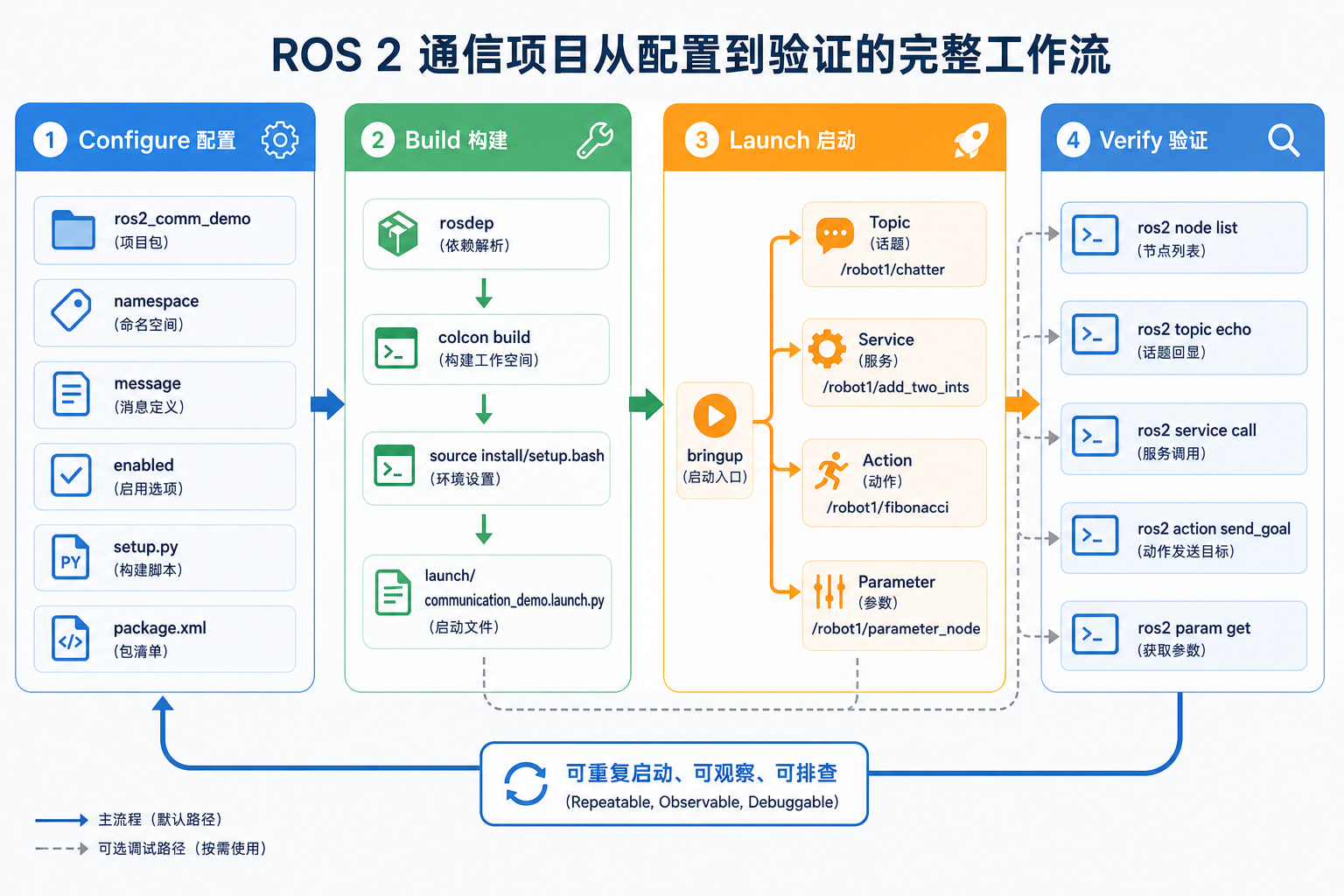
《ROS2 通信机制专项路线:Topic、Service、Action、Parameter》
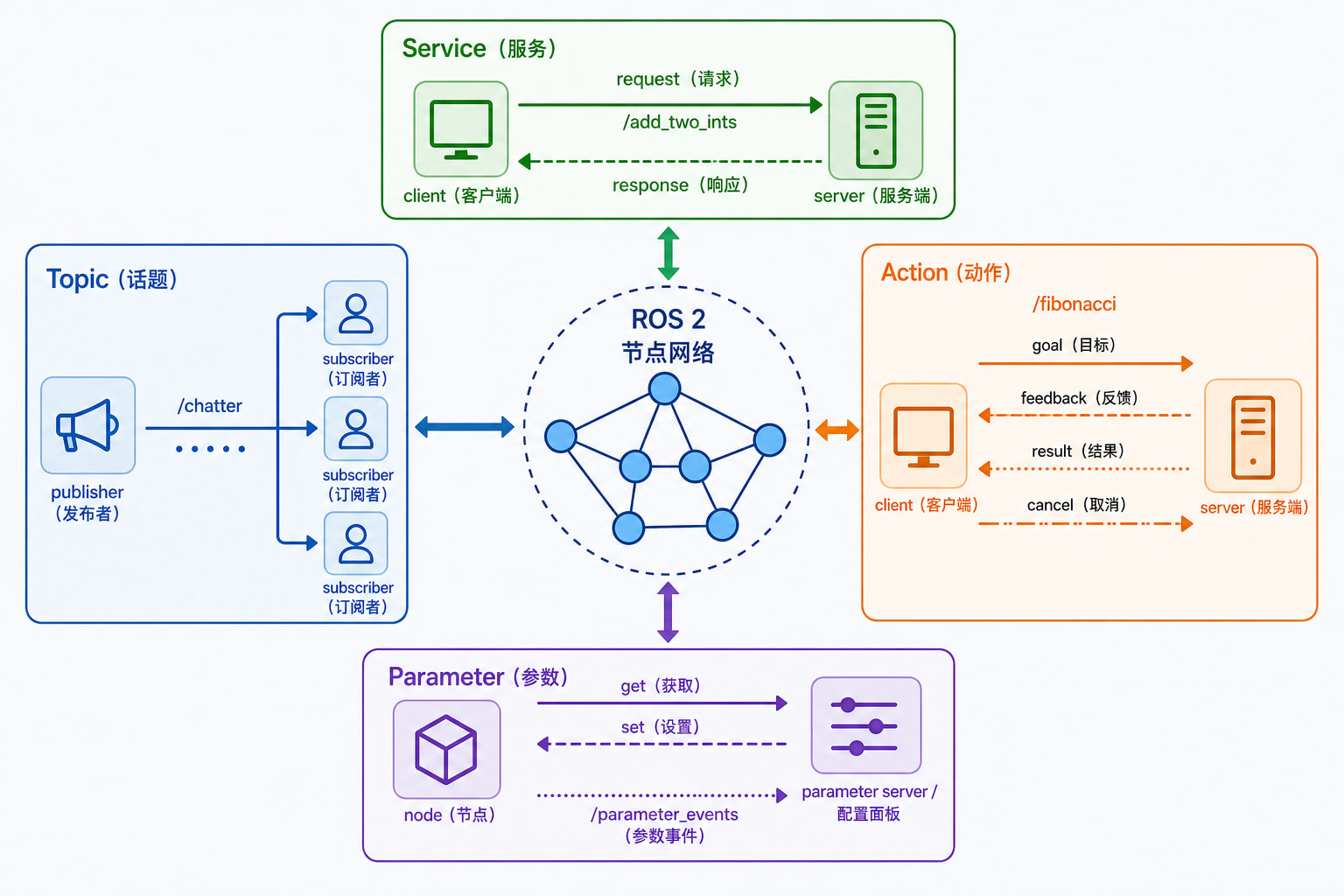
ROS 2 中的 Topic、Service、Action 和 Parameter 都能让节点交换信息,但它们解决的问题不同。Topic 适合持续的数据流,Service 适合一次请求和一次响应,Action 适合可反馈、可取消的长任务,Parameter 适合节点配置和运行时状态调整。
本文以一个可运行的 ros2_comm_demo Python 包为例,依次演示四种通信机制、命名空间与 QoS、命令行检查、统一 launch 启动和常见故障排查。读完后,可以根据数据的生命周期、调用方式和可靠性要求选择合适的接口。
1. 版本与前置条件
| 项目 | 本文目标 |
|---|---|
| ROS 2 主示例 | Humble |
| ROS 2 兼容 | Jazzy |
| Humble 系统 | Ubuntu 22.04 |
| Jazzy 系统 | Ubuntu 24.04 |
| 编程语言 | Python 3 |
| 构建工具 | colcon + ament_python |
Humble 和 Jazzy 的 rclpy、接口消息和命令行工具在本文用法中基本一致。不同发行版的包名、默认 QoS 或命令参数可能有小差异,遇到差异时应以当前发行版的官方文档为准。
开始前需要:
- 已安装 ROS 2,并能 source 系统环境。
- 已安装 colcon、rosdep 和 Python 构建工具。
- 当前用户拥有一个可写的 ROS 2 工作空间。
- 能够安装 rclpy、std_msgs、example_interfaces、launch 和 launch_ros。
检查当前环境:
printenv ROS_DISTRO
printenv ROS_VERSION
which ros2
which colcon
ros2 doctor --report
加载 ROS 2 环境并安装依赖:
source /opt/ros/$ROS_DISTRO/setup.bash
sudo apt update
sudo apt install \
  python3-colcon-common-extensions \
  python3-rosdep \
  ros-$ROS_DISTRO-rclpy \
  ros-$ROS_DISTRO-std-msgs \
  ros-$ROS_DISTRO-example-interfaces \
  ros-$ROS_DISTRO-launch \
  ros-$ROS_DISTRO-launch-ros
确认接口存在:
ros2 interface show std_msgs/msg/String
ros2 interface show example_interfaces/srv/AddTwoInts
ros2 interface show example_interfaces/action/Fibonacci
2. 四种通信机制的基本模型
ROS 2 节点通过接口类型和名称连接。接口类型定义数据结构,名称决定连接对象,QoS 决定 Topic 等数据通道在可靠性、队列和持久性方面的行为。
| 机制 | 交互模型 | 适合场景 | 典型例子 |
|---|---|---|---|
| Topic | 异步发布/订阅 | 连续数据流、状态广播 | 传感器、里程计、日志 |
| Service | 请求/响应 | 短操作、立即返回结果 | 加载配置、计算一次结果 |
| Action | 目标、反馈、结果、取消 | 耗时任务、可观察进度 | 导航、轨迹执行、抓取 |
| Parameter | 节点配置和运行时设置 | 频率、开关、阈值 | use_sim_time、调试开关 |
Topic 通常不要求发布者等待订阅者。Service 的客户端需要等待服务端返回响应,不适合长时间阻塞。Action 会把一个任务拆成目标、反馈和最终结果,并允许客户端取消目标。Parameter 不是普通的数据流接口,它主要描述节点自身的配置,同时会通过参数事件通知变化。
选择接口时,先看三个问题:数据是持续产生还是一次产生?调用者是否需要等待明确结果?任务是否可能持续较长时间、需要反馈或取消?四种接口不是四种写法,而是四种不同的交互契约。
2.1 Topic:持续的数据流
Topic 是最常见的异步通信方式。发布者将消息写入某个名称,订阅者对同一个名称建立订阅。一个 Topic 可以有多个发布者和订阅者,但消息是否能匹配,还要受到消息类型和 QoS 兼容性的影响。
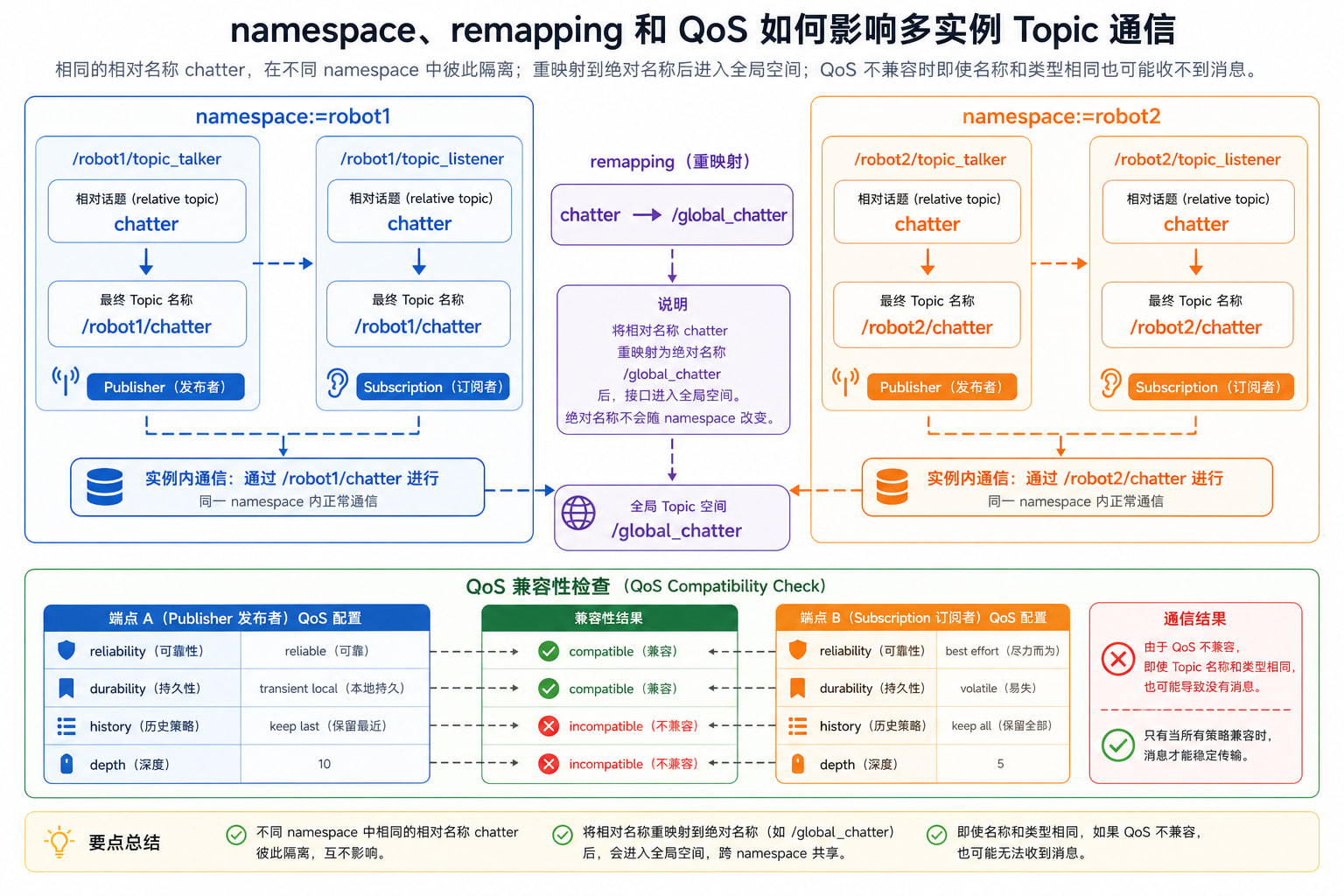
Topic 名称建议使用相对名称,再由 namespace 和 remapping 组合成最终名称。例如节点内部使用 chatter,节点位于 /robot1 命名空间时,最终名称通常是 /robot1/chatter。如果写成 /global_chatter,它就是绝对名称,不会随着命名空间变化。
2.2 Service:一次请求和一次响应
Service 适合短操作,例如“计算两个数的和”“切换一个模式”或“读取一次状态”。客户端发送请求,服务端执行回调并返回响应。服务调用者应该能够接受失败、超时或服务暂时不可用,不能把 Service 当作持续数据通道。
Service 的接口类型分为请求字段和响应字段。example_interfaces/srv/AddTwoInts 的请求包含 a、b,响应包含 sum。同一个服务名称只能对应兼容的接口类型,否则客户端无法正确解析响应。
2.3 Action:可反馈、可取消的长任务
Action 用于一个任务可能运行较长时间,并且调用者希望观察进度或主动取消的情况。一个 Action 目标通常经历以下状态:
- 客户端发送 goal。
- 服务端接受或拒绝 goal。
- 服务端执行任务并发布 feedback。
- 客户端等待 result,或者发送 cancel 请求。
- 服务端返回结果并结束 goal。
Action 底层会使用多个 ROS 2 通道,但使用者不需要手动管理这些底层名称。应当通过 ros2 action list、ros2 action info 和 Action 客户端 API 操作。
2.4 Parameter:节点配置和运行时设置
Parameter 通常属于某个节点。节点可以声明参数、读取参数、设置默认值,并根据参数改变行为。命令行可以通过 --ros-args -p name:=value 在启动时覆盖参数,也可以使用 ros2 param set 在运行过程中修改参数。
Parameter 修改会产生参数事件,常用于调试工具或配置管理。参数适合描述节点行为,不适合替代 Topic 的持续状态发布,也不适合替代 Action 的任务进度。
2.5 类型、名称和 QoS 必须同时匹配
ROS 2 通信是否建立,至少要同时满足三个条件:名称解析后相同、接口类型相同、QoS 能够兼容。只检查 ros2 topic list 只能证明名称存在,不能证明消息一定能够从发布者送到订阅者。排查时应依次查看完整名称、接口类型、端点数量和 QoS 详情。
对于 Service 和 Action,还要额外检查服务端或 Action 服务端是否已经启动。对于 Parameter,要检查参数属于哪个节点,不能只根据参数名判断目标对象。把“名称存在”和“数据已经流通”区分开,是排查 ROS 2 通信问题的第一步。
3. 创建可运行的示例包
下面创建一个 ros2_comm_demo 包,提供五个可执行程序:
- topic_talker:发布字符串 Topic。
- topic_listener:订阅字符串 Topic。
- add_two_ints_server:提供加法 Service。
- fibonacci_action_server:提供 Fibonacci Action。
- parameter_node:演示声明、读取和动态修改 Parameter。
创建工作空间和包:
mkdir -p ~/ros2_ws/src
cd ~/ros2_ws/src

ros2 pkg create ros2_comm_demo \
  --build-type ament_python \
  --dependencies rclpy std_msgs example_interfaces launch launch_ros

cd ros2_comm_demo
mkdir -p launch
目录结构:
ros2_comm_demo/
├── launch/
├── ros2_comm_demo/
│   └── __init__.py
├── package.xml
├── resource/
├── setup.cfg
└── setup.py
打开 setup.py,确认安装规则和可执行入口如下:
from glob import glob
import os

from setuptools import setup


package_name = 'ros2_comm_demo'

setup(
    name=package_name,
    version='0.0.0',
    packages=[package_name],
    data_files=[
        (
            'share/ament_index/resource_index/packages',
            ['resource/' + package_name],
        ),
        ('share/' + package_name, ['package.xml']),
        (
            os.path.join('share', package_name, 'launch'),
            glob('launch/*.launch.py'),
        ),
    ],
    install_requires=['setuptools'],
    zip_safe=True,
    entry_points={
        'console_scripts': [
            'topic_talker = ros2_comm_demo.communication_nodes:topic_talker',
            'topic_listener = ros2_comm_demo.communication_nodes:topic_listener',
            'add_two_ints_server = ros2_comm_demo.communication_nodes:add_two_ints_server',
            'fibonacci_action_server = ros2_comm_demo.communication_nodes:fibonacci_action_server',
            'parameter_node = ros2_comm_demo.communication_nodes:parameter_node',
        ],
    },
)
4. 示例一:Topic 发布与订阅
创建文件 ros2_comm_demo/communication_nodes.py,写入完整节点代码:
import time

import rclpy
from example_interfaces.action import Fibonacci
from example_interfaces.srv import AddTwoInts
from rclpy.action import ActionServer, CancelResponse, GoalResponse
from rclpy.node import Node
from std_msgs.msg import String


class TopicTalker(Node):
    def __init__(self):
        super().__init__('topic_talker')
        self.publisher = self.create_publisher(String, 'chatter', 10)
        self.declare_parameter('period', 1.0)
        period = float(self.get_parameter('period').value)
        self.count = 0
        self.timer = self.create_timer(period, self.publish_message)

    def publish_message(self):
        message = String()
        message.data = f'hello {self.count}'
        self.publisher.publish(message)
        self.get_logger().info(f'Publishing: {message.data}')
        self.count += 1


class TopicListener(Node):
    def __init__(self):
        super().__init__('topic_listener')
        self.subscription = self.create_subscription(
            String,
            'chatter',
            self.receive_message,
            10,
        )

    def receive_message(self, message):
        self.get_logger().info(f'Received: {message.data}')


class AddTwoIntsServer(Node):
    def __init__(self):
        super().__init__('add_two_ints_server')
        self.service = self.create_service(
            AddTwoInts,
            'add_two_ints',
            self.handle_request,
        )

    def handle_request(self, request, response):
        response.sum = request.a + request.b
        self.get_logger().info(
            f'{request.a} + {request.b} = {response.sum}'
        )
        return response


class FibonacciActionServer(Node):
    def __init__(self):
        super().__init__('fibonacci_action_server')
        self.action_server = ActionServer(
            self,
            Fibonacci,
            'fibonacci',
            execute_callback=self.execute_callback,
            goal_callback=self.goal_callback,
            cancel_callback=self.cancel_callback,
        )

    def goal_callback(self, goal_request):
        if goal_request.order < 1:
            self.get_logger().warning('Rejecting an invalid goal')
            return GoalResponse.REJECT
        return GoalResponse.ACCEPT

    def cancel_callback(self, goal_handle):
        self.get_logger().info('Cancel request accepted')
        return CancelResponse.ACCEPT

    def execute_callback(self, goal_handle):
        sequence = [0, 1]
        feedback = Fibonacci.Feedback()

        for _ in range(1, goal_handle.request.order):
            if goal_handle.is_cancel_requested:
                goal_handle.canceled()
                result = Fibonacci.Result()
                result.sequence = sequence
                return result

            sequence.append(sequence[-1] + sequence[-2])
            feedback.sequence = sequence
            goal_handle.publish_feedback(feedback)
            time.sleep(0.2)

        goal_handle.succeed()
        result = Fibonacci.Result()
        result.sequence = sequence
        return result


class ParameterDemo(Node):
    def __init__(self):
        super().__init__('parameter_node')
        self.declare_parameter('message', 'parameter hello')
        self.declare_parameter('enabled', True)
        self.count = 0
        self.timer = self.create_timer(1.0, self.tick)

    def tick(self):
        enabled = bool(self.get_parameter('enabled').value)
        message = str(self.get_parameter('message').value)

        if enabled:
            self.get_logger().info(f'{message} #{self.count}')
            self.count += 1


def run_node(node_type):
    rclpy.init()
    node = node_type()
    try:
        rclpy.spin(node)
    except KeyboardInterrupt:
        pass
    finally:
        node.destroy_node()
        rclpy.shutdown()


def topic_talker():
    run_node(TopicTalker)


def topic_listener():
    run_node(TopicListener)


def add_two_ints_server():
    run_node(AddTwoIntsServer)


def fibonacci_action_server():
    run_node(FibonacciActionServer)


def parameter_node():
    run_node(ParameterDemo)
构建包:
cd ~/ros2_ws
rosdep install --from-paths src --ignore-src -r -y
colcon build --symlink-install --packages-select ros2_comm_demo
source install/setup.bash
在两个终端分别运行发布者和订阅者:
source /opt/ros/$ROS_DISTRO/setup.bash
source ~/ros2_ws/install/setup.bash
ros2 run ros2_comm_demo topic_talker
source /opt/ros/$ROS_DISTRO/setup.bash
source ~/ros2_ws/install/setup.bash
ros2 run ros2_comm_demo topic_listener
另开终端检查 Topic:
ros2 topic list
ros2 topic type /chatter
ros2 topic info /chatter -v
ros2 topic echo /chatter --once
ros2 topic hz /chatter
预期能看到 /chatter,消息类型为 std_msgs/msg/String,并且 Topic 有一个 publisher 和一个 subscription。ros2 topic echo --once 可以避免终端持续刷屏。
5. 示例二:Service 请求与响应
启动 Service 服务端:
ros2 run ros2_comm_demo add_two_ints_server
另开终端检查服务:
ros2 service list
ros2 service type /add_two_ints
ros2 service info /add_two_ints
发送一次请求:
ros2 service call /add_two_ints \
  example_interfaces/srv/AddTwoInts \
  "{a: 2, b: 3}"
预期响应为 sum: 5。Service 回调应该尽快返回。需要等待硬件、规划路径或执行多个阶段时,应优先考虑 Action,或者在 Service 内部采用明确的超时和异步设计。
6. 示例三:Action 目标、反馈和取消
启动 Action 服务端:
ros2 run ros2_comm_demo fibonacci_action_server
检查 Action:
ros2 action list
ros2 action info /fibonacci
ros2 interface show example_interfaces/action/Fibonacci
发送目标并查看反馈:
ros2 action send_goal \
  /fibonacci \
  example_interfaces/action/Fibonacci \
  "{order: 8}" \
  --feedback
输出中应包含 goal 是否接受、反馈序列和最终结果。Action 服务端实现了取消回调,实际项目中的客户端可以在任务执行期间调用 cancel。不要仅根据进程仍在运行就判断 Action 已经成功,应读取 goal 状态和 result。
7. 示例四:Parameter 声明、读取和动态修改
运行 Parameter 节点:
ros2 run ros2_comm_demo parameter_node
查看参数:
ros2 param list /parameter_node
ros2 param describe /parameter_node message
ros2 param get /parameter_node message
ros2 param get /parameter_node enabled
运行时修改参数:
ros2 param set /parameter_node message "updated from CLI"
ros2 param set /parameter_node enabled false
ros2 param get /parameter_node enabled
设置成功后,日志内容会变化;enabled 设为 false 后,节点停止输出。参数名称、参数类型和节点名称必须准确。字符串、布尔值、整数和浮点数不要依赖模糊的自动转换,应通过声明、参数文件或 ParameterValue 明确类型。
参数变化还可以通过事件 Topic 观察:
ros2 topic list | grep parameter_events
ros2 topic echo /parameter_events --once
8. 名称、命名空间与 QoS
8.1 相对名称和绝对名称
节点内部使用相对名称时,namespace 会参与最终名称计算:
ros2 run ros2_comm_demo topic_talker \
  --ros-args \
  -r __ns:=robot1
另一个终端启动同样位于 robot1 的订阅者:
ros2 run ros2_comm_demo topic_listener \
  --ros-args \
  -r __ns:=robot1
最终 Topic 通常是 /robot1/chatter。如果把 remapping 写成绝对目标:
ros2 run ros2_comm_demo topic_talker \
  --ros-args \
  -r __ns:=robot1 \
  -r chatter:=/global_chatter
最终话题会变为 /global_chatter,不会再随 robot1 变化。多实例系统中,优先使用相对名称和不同 namespace;只有确实需要全局接口时才使用绝对名称。
8.2 Topic QoS
Topic 的 QoS 主要包括:
| QoS 项 | 作用 | 常见选择 |
|---|---|---|
| reliability | 是否尽力送达 | reliable、best effort |
| durability | 是否保存旧消息 | volatile、transient local |
| history | 保存方式 | keep last、keep all |
| depth | 队列深度 | 10、100 |
发布者和订阅者的 QoS 必须兼容。传感器数据常使用 best effort,控制命令和关键状态通常更关注 reliable。不能只看到 Topic 名称相同就认为它们一定连通。
检查实际 QoS:
ros2 topic info /chatter -v
ros2 topic echo /chatter \
  --qos-reliability reliable \
  --qos-durability volatile
当同一套通信节点需要运行多份时,应先规划 namespace,再检查相对名称、重映射和 QoS 是否仍然兼容。
8.3 Service、Action 与 QoS 的边界
Service 和 Action 也有底层 QoS 配置,但大多数应用先使用默认值即可。只有在跨设备、弱网络、实时系统或高频数据场景中,才需要系统地调整 QoS。调整前要同时检查通信双方、网络链路和消息频率,不要只修改一个节点。
9. 用 launch 统一启动通信节点
在 launch/communication_demo.launch.py 中写入:
from launch import LaunchDescription
from launch.actions import DeclareLaunchArgument
from launch.substitutions import LaunchConfiguration
from launch_ros.actions import Node
from launch_ros.parameter_descriptions import ParameterValue


def generate_launch_description():
    namespace = LaunchConfiguration('namespace')
    message = LaunchConfiguration('message')
    enabled = ParameterValue(
        LaunchConfiguration('enabled'),
        value_type=bool,
    )

    return LaunchDescription([
        DeclareLaunchArgument(
            'namespace',
            default_value='comm_demo',
            description='通信节点使用的命名空间',
        ),
        DeclareLaunchArgument(
            'message',
            default_value='hello from launch',
            description='Parameter 节点输出的消息',
        ),
        DeclareLaunchArgument(
            'enabled',
            default_value='true',
            description='是否启用 Parameter 节点输出',
        ),
        Node(
            package='ros2_comm_demo',
            executable='topic_talker',
            name='topic_talker',
            namespace=namespace,
            parameters=[{'period': 1.0}],
            output='screen',
        ),
        Node(
            package='ros2_comm_demo',
            executable='topic_listener',
            name='topic_listener',
            namespace=namespace,
            output='screen',
        ),
        Node(
            package='ros2_comm_demo',
            executable='add_two_ints_server',
            name='add_two_ints_server',
            namespace=namespace,
            output='screen',
        ),
        Node(
            package='ros2_comm_demo',
            executable='fibonacci_action_server',
            name='fibonacci_action_server',
            namespace=namespace,
            output='screen',
        ),
        Node(
            package='ros2_comm_demo',
            executable='parameter_node',
            name='parameter_node',
            namespace=namespace,
            parameters=[
                {
                    'message': message,
                    'enabled': enabled,
                },
            ],
            output='screen',
        ),
    ])
构建并统一启动:
cd ~/ros2_ws
colcon build --symlink-install --packages-select ros2_comm_demo
source install/setup.bash

ros2 launch ros2_comm_demo communication_demo.launch.py \
  namespace:=robot1 \
  message:="hello from robot1" \
  enabled:=true
另开终端验证四种接口:
ros2 node list
ros2 topic list
ros2 service list
ros2 action list
ros2 param get /robot1/parameter_node message
发送 Service 请求:
ros2 service call /robot1/add_two_ints \
  example_interfaces/srv/AddTwoInts \
  "{a: 10, b: 32}"
发送 Action 目标:
ros2 action send_goal \
  /robot1/fibonacci \
  example_interfaces/action/Fibonacci \
  "{order: 6}" \
  --feedback
此时同一个 launch 入口同时管理 Topic、Service、Action 和 Parameter 节点,日常运行只需要记住一个命令,调试时仍可以单独启动某个可执行程序。
10. 四种机制的选型方法
可以先用下面的判断顺序选择接口:
- 数据是否持续产生?是,优先 Topic。
- 是否只需要一次请求和一次结果?是,优先 Service。
- 是否可能运行较长时间,需要反馈或取消?是,优先 Action。
- 是否是在改变某个节点的配置或运行开关?是,使用 Parameter。
- 如果既要持续数据又要控制任务,可以组合使用。例如导航系统用 Topic 发布地图和里程计,用 Action 执行导航目标,用 Parameter 配置速度限制。
不要用 Parameter 代替实时数据流,不要用 Service 伪装长时间任务,也不要把 Action 当作高频传感器通道。接口的选择会影响调用者、测试方式、异常处理和系统扩展。
10.1 常见的组合方式
实际机器人系统通常同时使用多种机制:Topic 发布传感器和状态,Service 执行清理或切换模式,Action 执行导航或轨迹任务,Parameter 保存速度限制、调试开关和超时阈值。组合时要明确每种接口的职责,并让名称、namespace 和生命周期保持一致。
例如,一个导航模块可以通过 /robot1/scan 接收激光 Topic,通过 /robot1/navigate_to_pose 接收 Action 目标,通过 /robot1/clear_costmap 提供 Service,再用 max_velocity Parameter 控制运行配置。这样既能持续传输数据,又能对一次任务提供明确的成功、失败和取消结果。
11. ROS 2 通信 API 与命令速查
11.1 命令行检查
| 目标 | 命令 |
|---|---|
| 查看节点 | ros2 node list、ros2 node info /node |
| 查看 Topic | ros2 topic list、ros2 topic info /topic -v |
| 查看 Service | ros2 service list、ros2 service type /service |
| 查看 Action | ros2 action list、ros2 action info /action |
| 查看 Parameter | ros2 param list /node、ros2 param get /node name |
11.2 Python 常用接口
publisher = node.create_publisher(MessageType, 'topic', 10)
subscription = node.create_subscription(
    MessageType,
    'topic',
    callback,
    10,
)
service = node.create_service(ServiceType, 'service', callback)
action_server = ActionServer(
    node,
    ActionType,
    'action',
    execute_callback=execute_callback,
)
node.declare_parameter('name', default_value)
node.get_parameter('name').value
11.3 常见 ROS 参数传递方式
启动时传入:
ros2 run ros2_comm_demo parameter_node \
  --ros-args \
  -p message:="hello" \
  -p enabled:=true
使用 launch 参数:
ros2 launch ros2_comm_demo communication_demo.launch.py \
  namespace:=robot1 \
  message:="hello"
使用 YAML 参数文件时,格式示例:
/**:
  ros__parameters:
    message: hello from yaml
    enabled: true
12. 标准构建、运行和验证流程
每次新增或修改通信节点,都可以按以下顺序检查。
步骤 1:检查 Python 语法
python3 -m py_compile ros2_comm_demo/communication_nodes.py
python3 -m py_compile launch/communication_demo.launch.py
步骤 2:安装依赖并构建
cd ~/ros2_ws
rosdep install --from-paths src --ignore-src -r -y
colcon build --symlink-install --packages-select ros2_comm_demo
source install/setup.bash
步骤 3:确认可执行程序和 launch 文件
ros2 pkg executables ros2_comm_demo
ros2 launch ros2_comm_demo communication_demo.launch.py --show-args
步骤 4:启动并检查图
ros2 launch ros2_comm_demo communication_demo.launch.py namespace:=robot1

ros2 node list
ros2 topic list
ros2 service list
ros2 action list
步骤 5:逐种接口验证
ros2 topic echo /robot1/chatter --once
ros2 service call /robot1/add_two_ints \
  example_interfaces/srv/AddTwoInts \
  "{a: 1, b: 2}"
ros2 action send_goal /robot1/fibonacci \
  example_interfaces/action/Fibonacci \
  "{order: 5}" \
  --feedback
ros2 param get /robot1/parameter_node message
预期结果是:Topic 能收到字符串,Service 返回 sum,Action 返回 Fibonacci 序列,Parameter 查询返回当前值。停止 launch 后,应确认没有遗留的节点进程或旧工作空间路径。
13. 常见问题
1. Topic 有名称但没有消息
先检查消息类型、发布者数量、订阅者数量和 QoS:
ros2 topic type /robot1/chatter
ros2 topic info /robot1/chatter -v
ros2 topic echo /robot1/chatter --once
常见原因是相对名称和绝对名称不一致、两个节点处于不同 namespace,或者 QoS 不兼容。
2. Service 找不到
检查服务端是否启动、名称是否带有正确 namespace:
ros2 service list
ros2 service type /robot1/add_two_ints
ros2 node list
如果服务名称存在但类型错误,客户端必须使用服务端实际提供的接口类型。
3. Action 目标一直等待
检查 Action 服务端是否在运行,以及目标名称和接口类型是否准确:
ros2 action list
ros2 action info /robot1/fibonacci
ros2 interface show example_interfaces/action/Fibonacci
Action 的执行回调不能长时间阻塞 ROS 2 事件处理线程;复杂任务应考虑线程、异步执行或拆分工作。
4. Parameter 设置失败
确认参数已经声明,参数名和类型正确:
ros2 param list /robot1/parameter_node
ros2 param describe /robot1/parameter_node message
ros2 param set /robot1/parameter_node enabled false
一个节点默认不一定接受任意新参数。需要可配置的参数应在节点启动时声明。
5. 命令行修改没有效果
确认当前终端 source 的是最新工作空间,并检查目标节点完整名称:
ros2 pkg prefix ros2_comm_demo
ros2 node list
ros2 param get /robot1/parameter_node message
如果启动的是旧 install 空间中的节点,源码修改不会立即反映到运行结果。
6. 两套实例互相干扰
为不同实例设置不同 namespace,并避免节点内部写死绝对 Topic、Service、Action 或 frame 名称。启动多份节点后,分别检查最终名称:
ros2 node list
ros2 topic list
ros2 service list
ros2 action list
如果两套节点看起来名称正确但仍然无法通信,还要检查 ROS_DOMAIN_ID、终端加载的工作空间以及是否有旧进程残留。不同的 ROS_DOMAIN_ID 会把节点分到不同的 DDS 域中;不同工作空间则可能让同一个包名解析到不同的 install 路径。可以先关闭相关终端中的旧进程,再重新 source 系统环境和当前工作空间。
7. 参数类型不正确
命令行参数本质上来自字符串输入。布尔值、整数和浮点数应使用明确类型声明;在 launch 文件中可以使用 ParameterValue,在 YAML 中使用正确的 YAML 类型。
8. Launch 文件找不到
检查文件扩展名、setup.py 的 data_files 和安装空间:
find install/ros2_comm_demo/share/ros2_comm_demo/launch -type f -print
ros2 pkg prefix ros2_comm_demo
修改 setup.py 或新增 launch 文件后,需要重新构建并重新 source。
14. 项目级通信入口
完成本文示例后,项目可以整理为:
ros2_comm_demo/
├── launch/
│   └── communication_demo.launch.py
├── ros2_comm_demo/
│   ├── __init__.py
│   └── communication_nodes.py
├── package.xml
├── resource/
├── setup.cfg
└── setup.py
日常启动命令:
source /opt/ros/$ROS_DISTRO/setup.bash
source ~/ros2_ws/install/setup.bash

ros2 launch ros2_comm_demo communication_demo.launch.py \
  namespace:=robot1 \
  message:="hello from robot1" \
  enabled:=true
进入系统后,可以按以下顺序观察:
ros2 node list
ros2 topic echo /robot1/chatter --once
ros2 service call /robot1/add_two_ints \
  example_interfaces/srv/AddTwoInts \
  "{a: 7, b: 8}"
ros2 action send_goal /robot1/fibonacci \
  example_interfaces/action/Fibonacci \
  "{order: 5}" \
  --feedback
ros2 param get /robot1/parameter_node message
完成这些检查后,通信层就从一组零散命令变成了一个可重复启动、可观察和可排查的项目入口。