《rqt 全家桶:节点图、话题监控与实时调参》
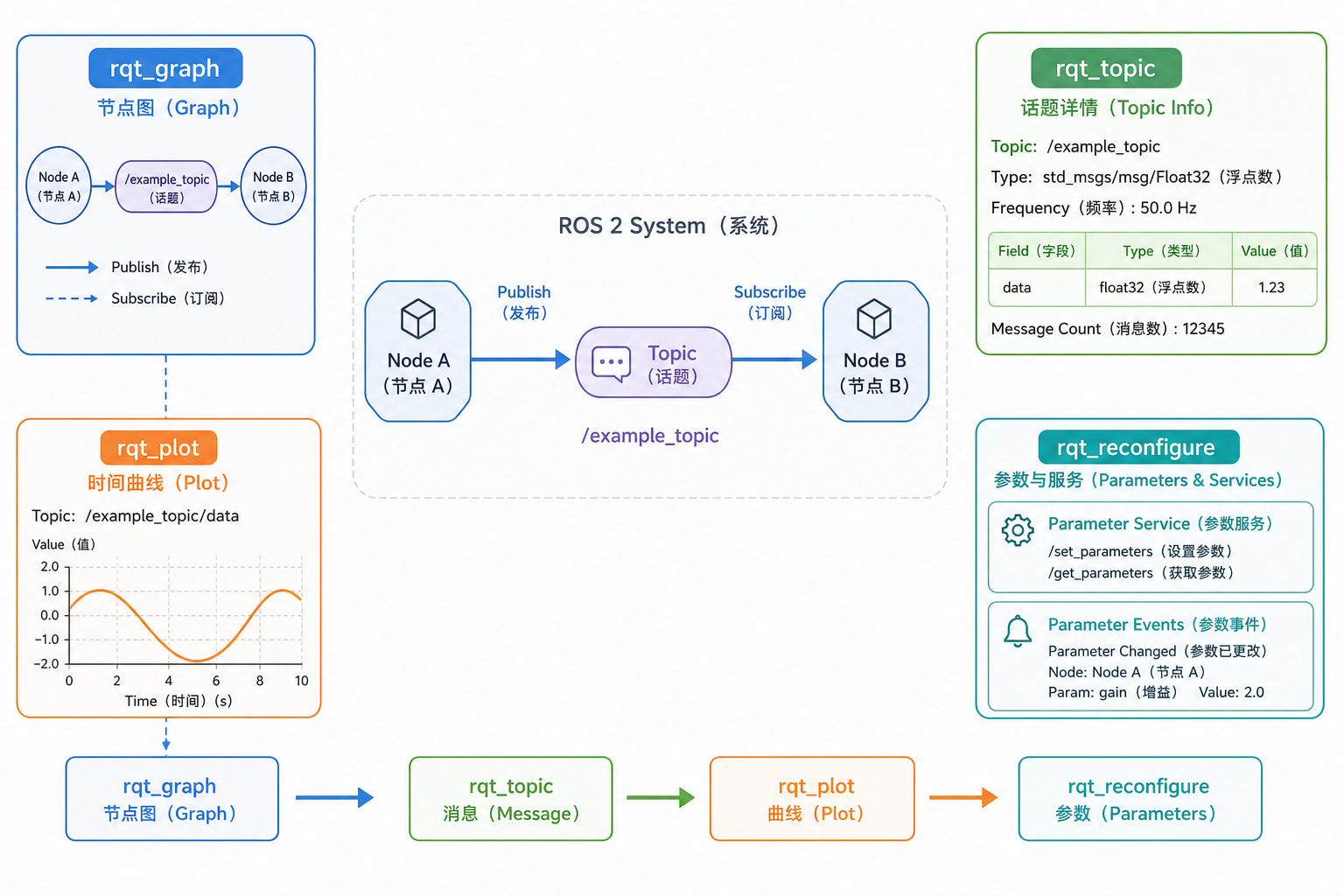
rqt 是 ROS 2 中最实用的一组图形化调试工具。它不能代替命令行,但能把分散在节点、话题和参数服务中的运行状态集中展示出来:rqt_graph 用于确认“谁在和谁通信”,rqt_topic 用于查看“正在传什么”,rqt_plot 用于观察“数值怎样随时间变化”,rqt_reconfigure 用于在节点运行期间修改参数。
本文先用 turtlesim 完成零代码的最小实验,再从零创建一个可运行的温控模拟包。最终会得到两个 ROS 2 节点和三个业务话题,并能在不重启节点的情况下修改目标温度、振幅、加热增益和启停状态,立即从消息与曲线中看到结果。
1. 版本、系统与前置条件
1.1 本文采用的环境
本文以以下组合为主线:
| 项目 | 本文环境 |
|---|---|
| 操作系统 | Ubuntu 24.04 LTS |
| ROS 版本 | ROS 2 Jazzy Jalisco |
| 语言 | Python 3、rclpy |
| 图形环境 | X11 或 Wayland 桌面 |
如果使用其他 ROS 2 发行版,需要把命令中的 jazzy 替换为对应发行版名称。ROS 1 中的 dynamic_reconfigure 与 ROS 2 参数机制不同,本文只讲 ROS 2。
1.2 安装所需软件
sudo apt update
sudo apt install -y \
  ros-jazzy-desktop \
  ros-jazzy-rqt \
  ros-jazzy-rqt-common-plugins \
  python3-colcon-common-extensions \
  python3-rosdep
source /opt/ros/jazzy/setup.bash
检查环境与四个核心插件:
printenv ROS_DISTRO
ros2 pkg executables rqt_graph
ros2 pkg executables rqt_topic
ros2 pkg executables rqt_plot
ros2 pkg executables rqt_reconfigure
新终端都要加载 ROS 环境;构建工作空间后还要加载工作空间环境:
source /opt/ros/jazzy/setup.bash
source ~/rqt_lab_ws/install/setup.bash
若设置了 ROS_DOMAIN_ID,所有终端必须一致。
2. rqt 观察的基本模型
ROS 2 系统可抽象为四层:
| 层次 | 主要问题 | 工具 |
|---|---|---|
| 计算图 | 有哪些节点,谁连着谁 | rqt_graph |
| 消息流 | 话题类型、频率、带宽、字段值 | rqt_topic、ros2 topic |
| 运行配置 | 节点有哪些参数,能否运行时修改 | rqt_reconfigure、ros2 param |
| 时间序列 | 数值是否震荡、漂移、饱和 | rqt_plot |
rqt_graph 显示的是 ROS 计算图中的端点关系,出现连线不代表数据一定持续到达。rqt_topic 会主动订阅话题并反序列化消息,因此能显示当前值和接收速率,但会增加负载。rqt_plot 只适合绘制数值叶子字段,例如 Float64.data 或 Temperature.temperature。rqt_reconfigure 通过参数服务读取并修改节点参数,不会把值写回 YAML 文件。
一个实用顺序是:先看图,再看话题类型与频率,然后画曲线,最后调参数并观察响应。
3. 启动 rqt 与识别插件
独立启动
ros2 run rqt_graph rqt_graph
ros2 run rqt_topic rqt_topic
ros2 run rqt_plot rqt_plot
ros2 run rqt_reconfigure rqt_reconfigure
也可以直接启动统一外壳:
rqt
然后从 Plugins 菜单加载图、话题、绘图和参数插件。
插件没有出现时
先确认包可见:
ros2 pkg prefix rqt_graph
ros2 pkg prefix rqt_topic
ros2 pkg prefix rqt_plot
ros2 pkg prefix rqt_reconfigure
如果菜单里没有,尝试:
rqt --force-discover
还不行就重新加载 ROS 环境,检查 ROS_DISTRO 和 AMENT_PREFIX_PATH。
4. 零代码最小示例:观察 turtlesim
这个示例用来确认四件事:节点连接、消息查看、二维曲线绘制、运行时改参数。
启动两个业务节点
终端 1:
source /opt/ros/jazzy/setup.bash
ros2 run turtlesim turtlesim_node
终端 2:
source /opt/ros/jazzy/setup.bash
ros2 run turtlesim turtle_teleop_key
用方向键驱动海龟移动。
用 rqt_graph 看连接
终端 3:
source /opt/ros/jazzy/setup.bash
ros2 run rqt_graph rqt_graph
应看到 /teleop_turtle 通过 /turtle1/cmd_vel 向 /turtlesim 发送速度命令,/turtlesim 还会发布 /turtle1/pose。
命令行核对:
ros2 node list
ros2 topic info /turtle1/cmd_vel --verbose
用 rqt_topic 看消息
终端 4:
source /opt/ros/jazzy/setup.bash
ros2 run rqt_topic rqt_topic
启用 /turtle1/pose,移动海龟时 x、y、theta、linear_velocity、angular_velocity 会更新。
命令行观察:
ros2 topic type /turtle1/pose
ros2 interface show turtlesim/msg/Pose
ros2 topic hz /turtle1/pose
用 rqt_plot 画位置曲线
source /opt/ros/jazzy/setup.bash
ros2 run rqt_plot rqt_plot /turtle1/pose/x /turtle1/pose/y
横向移动主要改变 x,纵向移动主要改变 y。
用 rqt_reconfigure 改参数
source /opt/ros/jazzy/setup.bash
ros2 run rqt_reconfigure rqt_reconfigure
选择 /turtlesim,修改 background_r、background_g、background_b,背景色会变化。
ros2 param list /turtlesim
ros2 param describe /turtlesim background_r
5. 节点图:从“看见连线”到定位通信问题
rqt_graph 中,节点通常显示为方框,话题位于节点之间,箭头方向代表消息流:
发布节点 -> 话题 -> 订阅节点
一个话题可以有多个发布者和多个订阅者。命名空间会成为节点名和相对话题名的前缀。
当期望的连线不存在时,推荐顺序:
ros2 node list
ros2 node info /目标节点
ros2 topic list -t
ros2 topic info /目标话题 --verbose
常见问题:
- 节点不在图中:进程退出、环境不同、发现域不同
- 节点存在但话题名不对:相对名或命名空间错误
- 两端都存在但没数据:QoS 不兼容或回调没执行
- 图中出现额外订阅者:
rqt_topic或rqt_plot正在观察
图形筛选只改变显示,不会停止节点。先用图建立直觉,再用命令行确认事实。
6. 话题监控:类型、频率与当前值
先确认类型:
ros2 topic list -t
ros2 topic type /turtle1/pose
ros2 interface show turtlesim/msg/Pose
三个命令不要混淆:
ros2 topic hz /目标话题
ros2 topic bw /目标话题
ros2 topic echo /目标话题 --once
hz看频率bw看带宽echo --once看一个样本
对高频或大消息,rqt_topic 会增加负担。观察者也是订阅者,打开多个插件会增加端点数量。
如果界面不更新,先用 ros2 topic echo 验证;若传感器使用 best_effort,可尝试:
ros2 topic echo /目标话题 --qos-reliability best_effort
7. 实时曲线:选择字段并正确解释
rqt_plot 的路径形式是:
/话题名/嵌套字段/数值叶子字段
例如:
/lab/target_temperature/data
/lab/temperature/temperature
/lab/heater_power/data
可以一次传入多条曲线:
ros2 run rqt_plot rqt_plot \
  /lab/target_temperature/data \
  /lab/temperature/temperature \
  /lab/heater_power/data
曲线能帮助判断:
- 目标变化后,测量值是否朝正确方向移动
- 输出是否饱和
- 系统是否震荡
- 发布周期是否断裂
但 rqt_plot 主要用于趋势判断,不适合严格的时间同步分析。需要离线分析时用 rosbag。
8. 实时调参:ROS 2 参数服务与约束
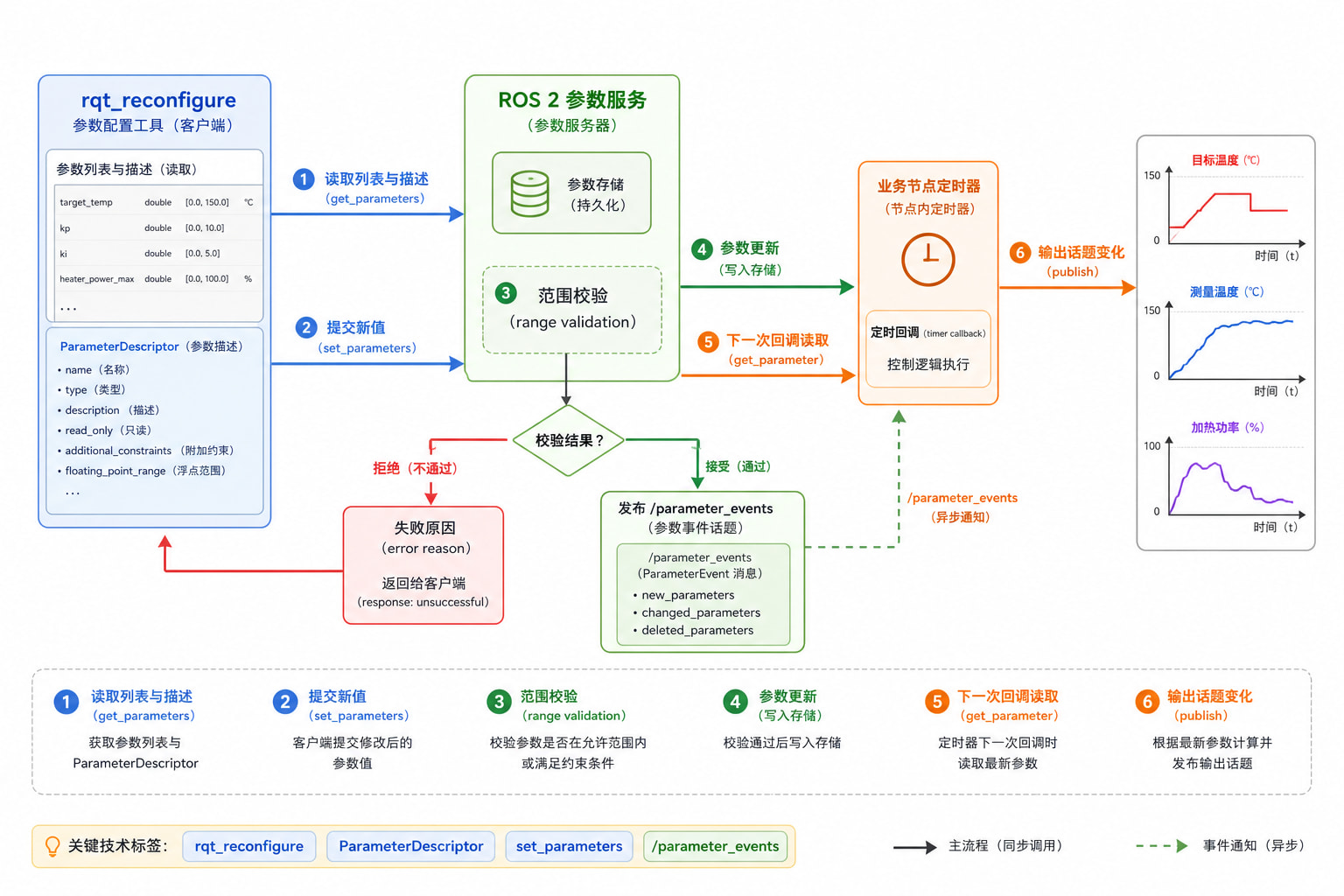
ROS 2 中,普通节点默认会提供参数服务。rqt_reconfigure 通过这些服务查看并修改参数。
参数除了名称和值,还可以带描述和范围。节点应在参数回调中校验关键约束,因为外部客户端不只有 GUI,还可能是命令行或自定义程序。
参数、话题和服务的边界:
- 参数:低频配置,如增益、阈值、开关
- 话题:连续数据流,如传感器数据和控制输出
- 服务:一次请求一次响应
YAML 只提供启动时初值。运行时修改参数不会回写原文件。
9. 创建温控观察工程
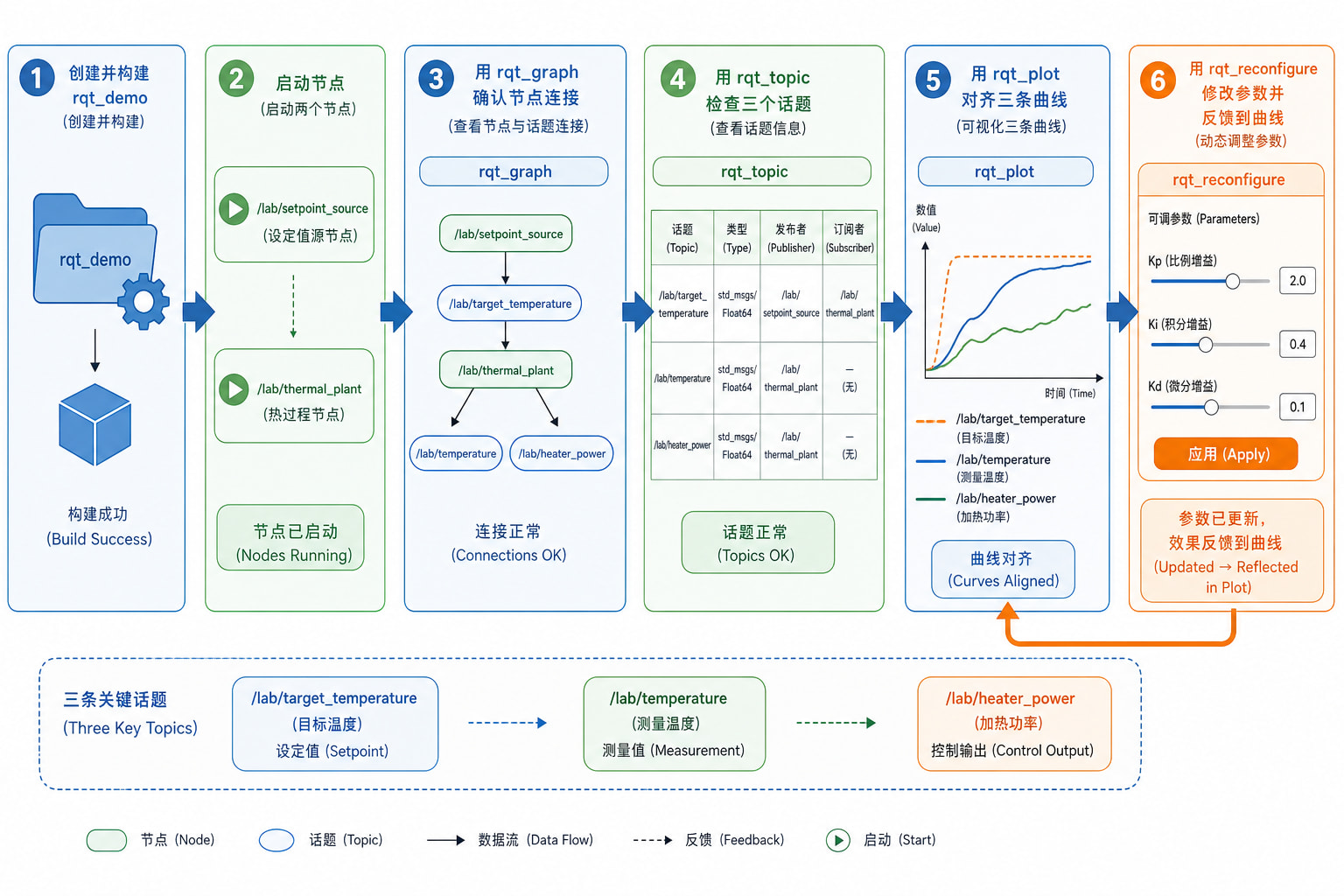
这一节创建全文唯一一套主线工程:
setpoint_source周期性发布目标温度thermal_plant订阅目标并模拟加热与散热- 再发布测量温度和加热器功率
创建目录
mkdir -p ~/rqt_lab_ws/src/rqt_demo/{rqt_demo,resource,launch,config}
cd ~/rqt_lab_ws/src/rqt_demo
touch resource/rqt_demo
touch rqt_demo/__init__.py
目录结构:
~/rqt_lab_ws/
└── src/
    └── rqt_demo/
        ├── config/demo.yaml
        ├── launch/rqt_lab.launch.py
        ├── resource/rqt_demo
        ├── rqt_demo/__init__.py
        ├── rqt_demo/setpoint_source.py
        ├── rqt_demo/thermal_plant.py
        ├── package.xml
        ├── setup.cfg
        └── setup.py
package.xml
<?xml version="1.0"?>
<package format="3">
  <name>rqt_demo</name>
  <version>0.1.0</version>
  <description>Observable thermal control demo for rqt tools.</description>
  <maintainer email="learner@example.com">learner</maintainer>
  <license>Apache-2.0</license>

  <buildtool_depend>ament_python</buildtool_depend>
  <exec_depend>ament_index_python</exec_depend>
  <exec_depend>launch</exec_depend>
  <exec_depend>launch_ros</exec_depend>
  <exec_depend>rcl_interfaces</exec_depend>
  <exec_depend>rclpy</exec_depend>
  <exec_depend>sensor_msgs</exec_depend>
  <exec_depend>std_msgs</exec_depend>

  <test_depend>ament_flake8</test_depend>
  <test_depend>ament_pep257</test_depend>
  <test_depend>python3-pytest</test_depend>

  <export>
    <build_type>ament_python</build_type>
  </export>
</package>
setup.py
from glob import glob
import os

from setuptools import find_packages, setup

package_name = 'rqt_demo'

setup(
    name=package_name,
    version='0.1.0',
    packages=find_packages(exclude=['test']),
    data_files=[
        (
            'share/ament_index/resource_index/packages',
            ['resource/' + package_name],
        ),
        ('share/' + package_name, ['package.xml']),
        (
            os.path.join('share', package_name, 'launch'),
            glob('launch/*.launch.py'),
        ),
        (
            os.path.join('share', package_name, 'config'),
            glob('config/*.yaml'),
        ),
    ],
    install_requires=['setuptools'],
    zip_safe=True,
    maintainer='learner',
    maintainer_email='learner@example.com',
    description='Observable thermal control demo for rqt tools.',
    license='Apache-2.0',
    tests_require=['pytest'],
    entry_points={
        'console_scripts': [
            'setpoint_source = rqt_demo.setpoint_source:main',
            'thermal_plant = rqt_demo.thermal_plant:main',
        ],
    },
)
setup.cfg
[develop]
script_dir=$base/lib/rqt_demo

[install]
install_scripts=$base/lib/rqt_demo
setpoint_source.py
import math

import rclpy
from rcl_interfaces.msg import (
    FloatingPointRange,
    ParameterDescriptor,
    SetParametersResult,
)
from rclpy.node import Node
from std_msgs.msg import Float64


def double_descriptor(description, minimum, maximum, step=0.0):
    return ParameterDescriptor(
        description=description,
        floating_point_range=[
            FloatingPointRange(
                from_value=minimum,
                to_value=maximum,
                step=step,
            )
        ],
    )


class SetpointSource(Node):

    def __init__(self):
        super().__init__('setpoint_source')

        self.declare_parameter('base_target', 24.0, double_descriptor('Center value of the target temperature.', 15.0, 35.0, 0.5))
        self.declare_parameter('amplitude', 2.0, double_descriptor('Sine wave amplitude.', 0.0, 8.0, 0.1))
        self.declare_parameter('period_sec', 20.0, double_descriptor('Sine wave period.', 2.0, 120.0, 1.0))

        self.publisher = self.create_publisher(Float64, 'target_temperature', 10)
        self.start_time = self.get_clock().now()
        self.add_on_set_parameters_callback(self.validate_parameters)
        self.timer = self.create_timer(0.2, self.on_timer)

    def validate_parameters(self, parameters):
        limits = {
            'base_target': (15.0, 35.0),
            'amplitude': (0.0, 8.0),
            'period_sec': (2.0, 120.0),
        }
        for parameter in parameters:
            if parameter.name not in limits:
                continue
            minimum, maximum = limits[parameter.name]
            if not minimum <= float(parameter.value) <= maximum:
                return SetParametersResult(successful=False, reason=f'{parameter.name} must be between {minimum} and {maximum}')
        return SetParametersResult(successful=True)

    def on_timer(self):
        elapsed = (self.get_clock().now() - self.start_time).nanoseconds / 1e9
        base_target = self.get_parameter('base_target').value
        amplitude = self.get_parameter('amplitude').value
        period_sec = self.get_parameter('period_sec').value

        target = base_target + amplitude * math.sin(2.0 * math.pi * elapsed / period_sec)
        msg = Float64()
        msg.data = float(target)
        self.publisher.publish(msg)


def main(args=None):
    rclpy.init(args=args)
    node = SetpointSource()
    try:
        rclpy.spin(node)
    except KeyboardInterrupt:
        pass
    finally:
        node.destroy_node()
        rclpy.shutdown()


if __name__ == '__main__':
    main()
thermal_plant.py
import random

import rclpy
from rcl_interfaces.msg import (
    FloatingPointRange,
    ParameterDescriptor,
    SetParametersResult,
)
from rclpy.node import Node
from sensor_msgs.msg import Temperature
from std_msgs.msg import Float64


def double_descriptor(description, minimum, maximum, step=0.0):
    return ParameterDescriptor(
        description=description,
        floating_point_range=[
            FloatingPointRange(
                from_value=minimum,
                to_value=maximum,
                step=step,
            )
        ],
    )


class ThermalPlant(Node):

    def __init__(self):
        super().__init__('thermal_plant')

        self.declare_parameter('ambient_temperature', 20.0, double_descriptor('Ambient temperature.', 0.0, 40.0, 0.5))
        self.declare_parameter('heating_gain', 0.45, double_descriptor('Error-to-power gain.', 0.0, 1.0, 0.01))
        self.declare_parameter('heater_strength', 1.8, double_descriptor('Heating rate.', 0.1, 5.0, 0.1))
        self.declare_parameter('cooling_rate', 0.08, double_descriptor('Cooling coefficient.', 0.0, 0.5, 0.01))
        self.declare_parameter('sensor_noise', 0.03, double_descriptor('Measurement noise.', 0.0, 1.0, 0.01))
        self.declare_parameter('enabled', True, ParameterDescriptor(description='Enable or disable the heater.'))

        self.temperature = self.get_parameter('ambient_temperature').value
        self.target_temperature = 24.0
        self.target_subscription = self.create_subscription(Float64, 'target_temperature', self.on_target, 10)
        self.temperature_publisher = self.create_publisher(Temperature, 'temperature', 10)
        self.power_publisher = self.create_publisher(Float64, 'heater_power', 10)
        self.add_on_set_parameters_callback(self.validate_parameters)
        self.timer = self.create_timer(0.2, self.on_timer)

    def validate_parameters(self, parameters):
        limits = {
            'ambient_temperature': (0.0, 40.0),
            'heating_gain': (0.0, 1.0),
            'heater_strength': (0.1, 5.0),
            'cooling_rate': (0.0, 0.5),
            'sensor_noise': (0.0, 1.0),
        }
        for parameter in parameters:
            if parameter.name not in limits:
                continue
            minimum, maximum = limits[parameter.name]
            if not minimum <= float(parameter.value) <= maximum:
                return SetParametersResult(successful=False, reason=f'{parameter.name} must be between {minimum} and {maximum}')
        return SetParametersResult(successful=True)

    def on_target(self, message):
        self.target_temperature = message.data

    def on_timer(self):
        dt = 0.2
        ambient = self.get_parameter('ambient_temperature').value
        heating_gain = self.get_parameter('heating_gain').value
        heater_strength = self.get_parameter('heater_strength').value
        cooling_rate = self.get_parameter('cooling_rate').value
        sensor_noise = self.get_parameter('sensor_noise').value
        enabled = self.get_parameter('enabled').value

        error = self.target_temperature - self.temperature
        power = max(0.0, min(1.0, heating_gain * error)) if enabled else 0.0

        heating = heater_strength * power
        cooling = cooling_rate * (self.temperature - ambient)
        self.temperature += (heating - cooling) * dt

        measured = self.temperature + random.gauss(0.0, sensor_noise)

        tmsg = Temperature()
        tmsg.header.stamp = self.get_clock().now().to_msg()
        tmsg.header.frame_id = 'room'
        tmsg.temperature = float(measured)
        tmsg.variance = float(sensor_noise ** 2)
        self.temperature_publisher.publish(tmsg)

        pmsg = Float64()
        pmsg.data = float(power)
        self.power_publisher.publish(pmsg)


def main(args=None):
    rclpy.init(args=args)
    node = ThermalPlant()
    try:
        rclpy.spin(node)
    except KeyboardInterrupt:
        pass
    finally:
        node.destroy_node()
        rclpy.shutdown()


if __name__ == '__main__':
    main()
demo.yaml
/lab/setpoint_source:
  ros__parameters:
    base_target: 24.0
    amplitude: 2.0
    period_sec: 20.0

/lab/thermal_plant:
  ros__parameters:
    ambient_temperature: 20.0
    heating_gain: 0.45
    heater_strength: 1.8
    cooling_rate: 0.08
    sensor_noise: 0.03
    enabled: true
rqt_lab.launch.py
import os

from ament_index_python.packages import get_package_share_directory
from launch import LaunchDescription
from launch_ros.actions import Node


def generate_launch_description():
    package_share = get_package_share_directory('rqt_demo')
    config_file = os.path.join(package_share, 'config', 'demo.yaml')

    return LaunchDescription([
        Node(
            package='rqt_demo',
            executable='setpoint_source',
            namespace='lab',
            name='setpoint_source',
            output='screen',
            parameters=[config_file],
        ),
        Node(
            package='rqt_demo',
            executable='thermal_plant',
            namespace='lab',
            name='thermal_plant',
            output='screen',
            parameters=[config_file],
        ),
    ])
10. 从零构建、运行和观察完整示例
安装依赖并构建
cd ~/rqt_lab_ws
source /opt/ros/jazzy/setup.bash
rosdep install --from-paths src --ignore-src -r -y
colcon build --symlink-install --packages-select rqt_demo
source install/setup.bash
检查安装结果:
ros2 pkg executables rqt_demo
ros2 pkg prefix rqt_demo
ls install/rqt_demo/share/rqt_demo/config
ls install/rqt_demo/share/rqt_demo/launch
启动业务节点
终端 1:
source /opt/ros/jazzy/setup.bash
source ~/rqt_lab_ws/install/setup.bash
ros2 launch rqt_demo rqt_lab.launch.py
应看到目标值和温度随时间变化。
建立基准事实
终端 2:
source /opt/ros/jazzy/setup.bash
source ~/rqt_lab_ws/install/setup.bash
ros2 node list
ros2 topic list -t | grep '^/lab/'
应看到:
/lab/setpoint_source
/lab/thermal_plant
/lab/heater_power [std_msgs/msg/Float64]
/lab/target_temperature [std_msgs/msg/Float64]
/lab/temperature [sensor_msgs/msg/Temperature]
继续检查频率和样本:
ros2 topic hz /lab/temperature
ros2 topic echo /lab/temperature --once
ros2 param get /lab/thermal_plant heating_gain
ros2 param get /lab/setpoint_source amplitude
用 rqt_graph 确认结构
source /opt/ros/jazzy/setup.bash
source ~/rqt_lab_ws/install/setup.bash
ros2 run rqt_graph rqt_graph
主链路应为:
/lab/setpoint_source -> /lab/target_temperature -> /lab/thermal_plant
/lab/thermal_plant 还会发布 /lab/temperature 和 /lab/heater_power。
用 rqt_topic 检查三个消息流
ros2 run rqt_topic rqt_topic
分别启用 /lab/target_temperature、/lab/temperature 和 /lab/heater_power。
用 rqt_plot 对齐目标、温度和功率
ros2 run rqt_plot rqt_plot \
  /lab/target_temperature/data \
  /lab/temperature/temperature \
  /lab/heater_power/data
若功率不明显,可单独绘制:
ros2 run rqt_plot rqt_plot /lab/heater_power/data
用 rqt_reconfigure 实时改变行为
ros2 run rqt_reconfigure rqt_reconfigure
先改 /lab/setpoint_source:
amplitude = 0.0,目标变成水平线base_target = 28.0,目标立即跳变period_sec = 8.0,再把amplitude = 2.0
再改 /lab/thermal_plant:
heating_gain = 0.10,升温变慢heating_gain = 0.80,升温更快- 关闭
enabled,功率变为 0,温度回落 - 再打开
enabled
命令行验证:
ros2 param get /lab/setpoint_source base_target
ros2 param get /lab/thermal_plant heating_gain
ros2 param get /lab/thermal_plant enabled
测试非法值:
ros2 param set /lab/thermal_plant heating_gain 2.0
应返回失败,参数值保持不变。
11. 常用命令与字段路径速查
节点与话题
| 目的 | 命令 |
|---|---|
| 列出节点 | ros2 node list |
| 查看节点端点 | ros2 node info /lab/thermal_plant |
| 列出话题和类型 | ros2 topic list -t |
| 查看端点与 QoS | ros2 topic info TOPIC --verbose |
| 查看一个样本 | ros2 topic echo TOPIC --once |
| 统计频率 | ros2 topic hz TOPIC |
| 查看接口 | ros2 interface show TYPE |
参数
| 目的 | 命令 |
|---|---|
| 列出节点参数 | ros2 param list NODE |
| 读取参数 | ros2 param get NODE NAME |
| 查看描述与范围 | ros2 param describe NODE NAME |
| 修改参数 | ros2 param set NODE NAME VALUE |
| 导出当前参数 | ros2 param dump NODE |
三条曲线路径
| 含义 | 话题类型 | rqt_plot 路径 |
|---|---|---|
| 目标温度 | std_msgs/msg/Float64 |
/lab/target_temperature/data |
| 测量温度 | sensor_msgs/msg/Temperature |
/lab/temperature/temperature |
| 加热功率 | std_msgs/msg/Float64 |
/lab/heater_power/data |
12. 常见问题与排错
rqt 窗口打开但没有节点
printenv ROS_DISTRO
printenv ROS_DOMAIN_ID
ros2 node list
如果 ros2 node list 为空,检查业务进程是否还在运行。必要时重启 CLI 守护进程:
ros2 daemon stop
ros2 daemon start
ros2 launch 找不到包或启动文件
cd ~/rqt_lab_ws
source /opt/ros/jazzy/setup.bash
colcon build --symlink-install --packages-select rqt_demo
source install/setup.bash
ros2 pkg prefix rqt_demo
如果启动文件缺失,检查 setup.py 的 data_files 是否包含 launch/*.launch.py。
节点存在但 /lab 话题没有连接
ros2 node info /lab/setpoint_source
ros2 node info /lab/thermal_plant
ros2 topic info /lab/target_temperature --verbose
rqt_plot 没有曲线
先确认话题有数据:
ros2 topic echo /lab/temperature --once
ros2 interface show sensor_msgs/msg/Temperature
然后输入正确字段路径:
/lab/temperature/temperature
rqt_reconfigure 看不到业务节点
ros2 param list /lab/thermal_plant
ros2 service list | grep '/lab/thermal_plant/.*parameters'
13. 使用建议
建议始终按这个顺序排查:
ros2 node list和rqt_graphros2 topic list -trqt_topic或ros2 topic echorqt_plotrqt_reconfigure
每次只改一个参数,记录修改前后的变化。调试时优先选择语义清晰、单位明确的数值话题。实时观察和离线分析要分开:rqt_topic 和 rqt_plot 适合当前状态,rosbag 适合复盘。
14. 总结
rqt_graph、rqt_topic、rqt_plot 和 rqt_reconfigure 分别覆盖结构、消息、趋势和配置四个角度。可靠的调试方式不是只打开一个窗口,而是先确认图关系,再检查话题类型与样本,随后对齐关键曲线,最后只改一个参数并观察因果变化。
本文的温控示例提供了一条完整可复现链路:/lab/setpoint_source 发布目标温度,/lab/thermal_plant 计算并发布测量温度与加热功率;三个数值字段可以实时绘制,节点参数可以在运行中修改,非法范围会被节点拒绝。